# Product introduction
# What is A1?
Welcome to A1, A1 - Everyone's art station!
A1 is an AI application platform with a mission to help everyone easily build AI art applications. The key features of A1 products are their simplicity and ease of use, the richness of application types, and free image generation. A1's vision is to become everyone's art station, making art creation as simple as speaking.
### Discover apps
The A1 platform has already launched over 1000+ apps, including a variety of avatar styles such as comic, dopamine, and 3D Disney, various AI portrait apps like Star Trek, Sailor Moon, and Christmas themes; as well as a wide range of emoji packs, artistic fonts, and more, all waiting for you to explore!
### **Build apps**
A1 is a platform where everyone can create AI apps. With over 300+ creators already publishing their own apps, you can easily create your own, like building blocks, turning your ideas and creativity into reality.
\
Have fun and if you have any questions, feel free to give us feedback. Contact us, and we will respond within 2 business days. Email address:
# Community Guidelines
A1 is an open community for UGC (User Generated Content) app creation and sharing. To ensure the platform is accessible and welcomed by the broadest range of users, content must comply with local policies and regulations.
* Be kind and respectful to each other. Do not create images or apps that are inherently disrespectful, aggressive, or otherwise offensive. Any form of violence or harassment is not tolerated.
* No adult or gory content. Please avoid creating visually shocking or disturbing content. We will automatically block certain text inputs.
* Do not publicly repost others' creations without their permission.
* Be cautious when sharing. You can share your creations outside the A1 community, but consider how others might view your content.
* Any violation of these rules may lead to the disabling of your account, resulting in the loss of the right to use the product services.
These rules apply to all content, and we will periodically update the community guidelines.
# App build
# How to build a new app?
### Create Your First App
* 🏃 If you want a quick start: Find an app on the homepage that's close to your idea — Click 'fork' to replicate it — Then continue to modify it.
* 🔥 If you want to challenge yourself: Click 'build' at the top of the page — 'empty' to start from scratch
### Step 1: Build the App's Logic
1. Let's focus on the left half of the interface to start building the app.
2. Give your app a catchy name.
3. Choose a style: The style will determine the artistic look of the images generated by the app; you can add multiple styles.
4. Add a scene description: Click the toolbar icon; describe the type of image you want the app to produce in the input box.
5. (Optional) Add a reference image: Click the toolbar icon — Click preset — Choose a control.
### Step 2: Design the User Experience
1. Now we need to pay attention to both sides of the interface. After building on the left, preview the app's state on the right side from the user's perspective.
2. Determine whether each setting is public and whether others using the app can see and change it:
3. Click preset: Keep settings private, others cannot change or see the settings.
4. Click user fill: Make settings public, others can freely modify and customize.
5. Create a text variable: Slide to select keywords in the text input box, click mark as variant to create; after the app is published, others can customize this part of the text.
### Step 3: Test and Publish the App
1. Fill out the form in the preview app area, and click the generate button to create an image.
2. Refine the image and remove the watermark: Click the button in the upper left corner of the image; wait a moment, and the image will be replaced with the refined result.
3. Choose the most satisfactory result; if not satisfied, you can always go back to the build area to continue adjusting.
4. Publish the app: Click the publish button
5. Congratulations on successfully publishing your first app! Share it with your friends! Click the share button on the app details page to share.
# App building skills
### Creating Your App: Start with the Right Style
1. Begin by navigating to the style interface and make an initial selection based on your creative needs, such as photography, painting, or design.
2. Next, consider the "versatility" of the style. Styles with high versatility are suitable for a wide range of images, while those with lower versatility are better for specific types of images.
3. For example, a photography style marked with a red frame indicates high versatility, making it suitable for almost any image. These "universal" styles should be your top picks.
4. Other styles may be more limited and designed for specific image types, known as "specialized" styles. If you have a particular creative vision, these styles could be perfect for you.
5. To differentiate between "universal" and "specialized" styles, first look at the title, then examine the example images.
6. For instance, a style titled "Retro Photography" with example images featuring people, pets, and still objects, suggests it's highly versatile.
7. In contrast, a style titled "Double Exposure" with example images all displaying double exposure effects, is a "specialized" style specifically for creating that particular look.
### Test the Style: A Simple Prompt or Image Can Help
Don't rush to adjust complex settings. Start with basic tests to better understand the effects of each style, which might also inspire your next creative idea. Give it a whirl and let inspiration flow naturally!
### Writing Prompts is Easy: Describe What You Want Directly
For example, "A girl surrounded by pink flowers in a sea of blossoms," and you'll get an image like the one below. Prompts are crucial; combining text with images is the most common (and effective) way to create.
### It's Recommended to Turn on the "Size" Switch: Let Users Choose the Dimensions of the Generated Image
image 1
# Portrait Photography App Tips
**Start Creating**
First, choose a style similar to the theme you want to create and generate a base image to use as your placeholder material.
### **Edit the Placeholder**
Next, cover or erase the face part of the placeholder image, then use the "Edge" tool to adjust the composition of the picture (this is a preset function by the creator).
### **Adjust Pose**:
Use the "Pose" tool to control the character's movements (another preset function by the creator).
### **Customize the Character**
If needed, use the "Character PRO" feature to upload a photo of the person you want to mimic, making the generated character more realistic.
### **Add Prompts**
Enter the same prompts used to generate the placeholder material, which will help the AI understand what you want to create.
### **Choose a Style**
Select a professional, realistic portrait style to ensure your work has high-quality visual effects.
### **Adjust Size**
Make sure the "Size" settings match the dimensions of your placeholder image (this is also a preset by the creator) to maintain overall consistency.
By following these simple steps, you can easily create professional-level portrait works. Remember, each step is to make your creation more perfect, so don't rush, take your time, and enjoy the creative process.
# 3D Character App Tips
### **Pick a 3D Style**
Start by selecting a 3D style that matches your desired theme to create an image.
### **Create a Placeholder**
Extract the character from the image to use as a placeholder, and adjust the pose with the "Pose" tool (a preset function by the creator).
### **Edit the Body Shape**
Remove the head and use the "Edge" tool to shape the body and props (another preset function by the creator).
### **Add Prompts**:
Use descriptive prompts to detail the content you want to portray (preset by the creator).
### **Match the Size**
Ensure the "Size" setting corresponds to the dimensions of the placeholder (preset by the creator).
### **Refine the Character**:
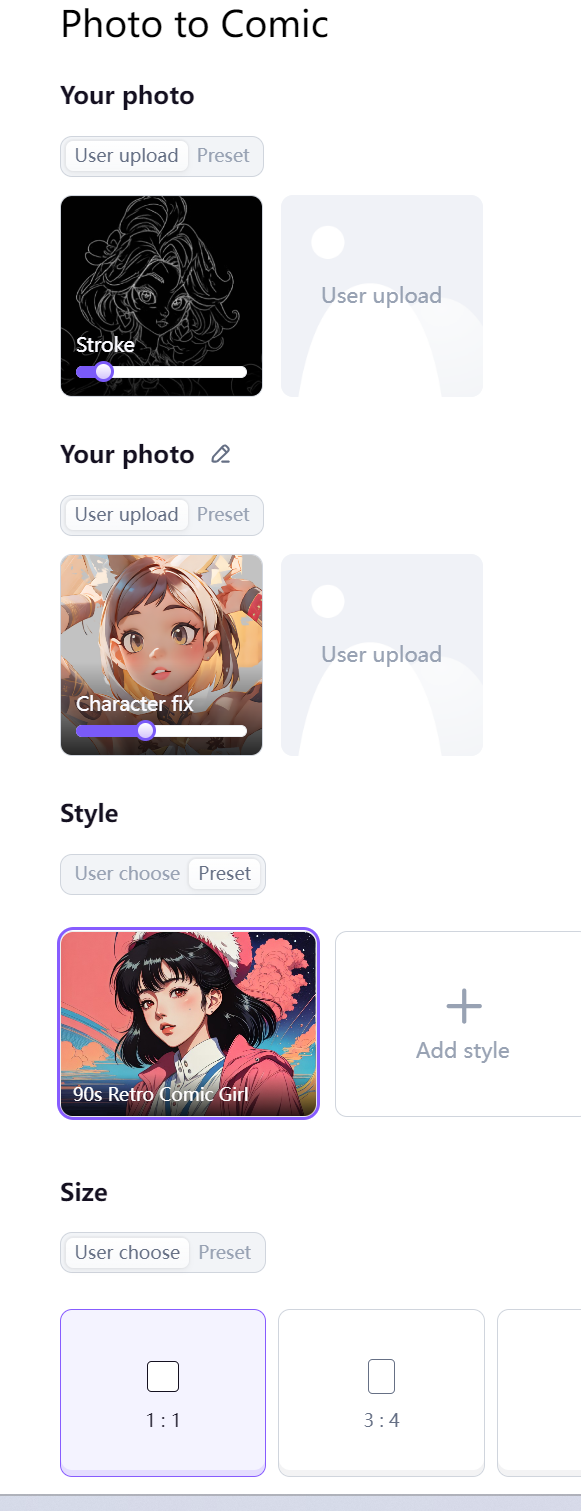
Combine the "Digital Avatar" and "Character Fix" features for a more realistic character look (requires user-uploaded materials).
# Style Transfer App Tips
### **Experiment with Style Transformations**:
Try converting between realistic and cartoon styles, or any two styles with a significant difference. Both directions can yield interesting results.
### **Use "Stroke" for Detail Preservation**:
Utilize the "Stroke" feature to preserve the outline details of your placeholder image (uploaded by the user).
### **Refine Character Appearance with "Character Fix"**:
Employ the "Character Fix" feature to make the final output resemble the character in the placeholder image more closely (uploaded by the user).
# About Fork
Build your own new app using existing A1 apps.
### **Recreate apps:**
* Click the fork feature.
* Edit the feature modules in any way you like to make it your own new app.
* Test the new app's functionality until you are satisfied and the performance is stable.
* Click on the 'Select Cover' option in the result image, then click the 'Publish' button, fill in the app name, choose a category, and successfully publish it.
# Subscription
# Payment lssues
Every AI application in the A1 community can be run for free, but if you need higher quality, watermark-free images, you will need to consume computing power to refine the images. We gift each user with 10 computing power. You can obtain more computing power through a subscription plan.
### **Subscription Plans**
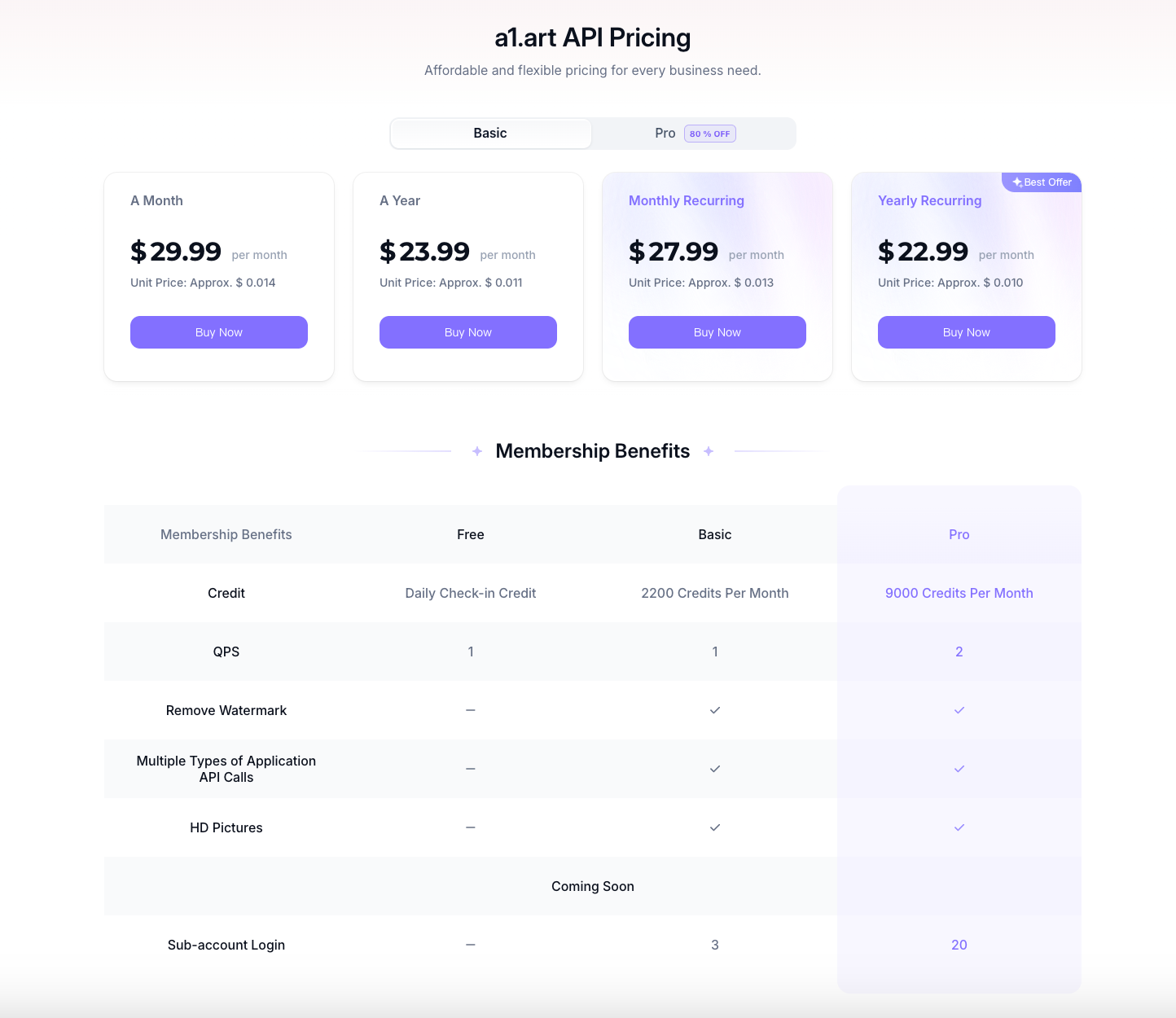
A1 offers two subscription levels. There is a 20% discount for annual subscriptions paid yearly. Each subscription plan includes the use of A1's refining services to obtain higher definition, better quality, watermark-free image results.
Explanation,The computing power obtained each month cannot be accumulated, please use it up within the month. Any unused computing power will become invalid the following month.
### **How to Subscribe**
Go to the A1 product homepage, click to view computing power, click 'upgrade', select your payment method, complete the payment, and your subscription will be successful.
### **Plan comparison**
### Payment Methods
Currently, we only accept payment methods supported by Stripe: credit or debit cards issued byService provider. such as Mastercard, VISA, or American Express. Stripe is a PCI Level 1 service provider, which is the most stringent certification level in the payment industry.
### Cancel subscription
You can cancel your subscription for the next cycle at any time. After cancellation, you will no longer enjoy the related benefits for the following month. However, the benefits already granted for the current month can continue to be enjoyed and used.
\
For any questions, send us an email at [**contact@A1.art**](mailto:contact@A1.art)**,** and we will respond within 2 business days.
# Reward Plan
# Earning Credit Rewards on a1.art
{% hint style="success" %}
[Click here to visit a1.art](https://a1.art/?source=a1zm\&plan=sq)
{% endhint %}
## 创建 a1.art 应用,赢取千元奖金和 1000+ 积分补贴
{% hint style="success" %}
**国内用户请**[**前往A1 应用创建 - 学习手册**](https://fyze31atzb.feishu.cn/docx/QJCXdqVUgoGsQqxqj4zc9DDAnqb)**直达活动详情** 🔥
{% endhint %}
## 1. How to get more free credits?
You can earn free points in the following four ways:
* **Published Image Selection by official:** 10 credits (Awarded when your image is picked by official)
* **Apps featured by official:** 100 credits (Awarded when your apps are featured by official)
:tada:Any app that gets officially featured will **earn a reward of 100 credits**, with no upper limit.
* **New user bonus:** 5 credits (Automatically awarded upon registering as a new user)
* **Daily login bonus:** 5 credits (Awarded daily for visiting a1.art)
## 2. How do credits work in a1.art?
Your credits will be spent on:
* **Generate images using apps built by others:** 1 credit can generate 4 images.
* **Generate images by testing your apps:** 1 credit can generate 4 images.
App creators can earn credit subsidies through our [**rewards plan**](#id-1.-how-to-get-more-free-credits)🏆 and upcoming creator incentive programs 💰 .
* **Remove watermarks and enhance image quality:** After generating images and using the ‘save’ feature. The ‘save’ feature allows you to remove watermarks and enhance image quality in one click, costs 1 credit.
How the ‘Save’ feature works in a1.art:
## 3. What is an a1.art App?
An a1.art app is a small tool that is publicly available in the a1.art community, designed to allow every user to generate AI images at very low cost and with minimal barriers. Similar to apps in the App Store, only a1.art focuses specifically on image creation.
[On the a1.art homepage,](https://a1.art/app?sortType=popular) what you see are applications that have been created and published by a1.art creators themselves. Each application offers different generative effects to meet the diverse needs of various users.
Once published, every app is available for public use by the community.
1600+ apps
## 4. Copyright and Privacy
We recommend using images that are either in the public domain or for which you hold the copyright when creating applications and publishing images. When you publish an image, both the original and the generated images will be made public, so consider copyright and privacy issues carefully. If you prefer not to disclose an image, simply choose not to publish it.
{% hint style="success" %}
When creating an application, you must publish at least one image before the application itself can be published
{% endhint %}
**How to Obtain Copyright-Free Images?**
We recommend using platforms like [Unsplash](https://unsplash.com/) to find images without copyright restrictions. Alternatively, you can use A1 or other AI tools to redraw and generate AI images for use as creation materials.
{% hint style="warning" %}
The final interpretation rights of this activity belong to the a1.art team. Any changes to information will be promptly notified in the group. → [Join our Discord](https://discord.com/invite/CA4Y9k5Pn3)
{% endhint %}
# Leaderboard Ranking Reward
We are excited to introduce the "Leaderboard Ranking Reward Plan" on a1.art, offering real cash profits (coming soon) and creator app-building credit bonuses to support creators and reward their creativity and efforts.
Build your a1.art apps now to explore new possibilities in AI! 😎
## 🏆 Ranking Rules
**🧩 Apps Ranking**
* **Ranking Data:** Based on the actual performance of the app runs (# of generations by users) over a certain period. (24 hours, 7 days, and all time)
* **Ranking Updates:** Rankings are updated and recalculated every 60 minutes.
**🧑🎨 Creators Ranking**
* **Ranking Data :** Based on the cumulative performance of app runs (# of generations by users) under the creator's account. (24 hours, 7 days, and all time)
* **Ranking Updates:** Rankings are updated and recalculated every 60 minutes.
**❤️ Notes:**
* Currently, rankings are determined based on the number of app runs, which directly reflects the number of user generations and might indicates the app's popularity. We hope this approach ensures that exceptional creators and outstanding and widely-used apps are properly recognized and rewarded.
* We are continually looking to improve our ranking system to better serve our community. Future updates to the ranking rules may be made to reflect these improvements and ensure fairness for all participants.
## 🎉 **Build apps to share the bonus**
**🙌 How to join Leaderboard Ranking Reward Program ?**
No participation threshold. This program is open to all creators. Welcome to participate in building your a1.art apps! Any original app creations you published on a1.art will earn credit rewards during each incentive period (weekly).
Credits will be calculated based on the actual performance of your app runs (# of generations by users), and both apps and creators that make it to the top 10 on the leaderboard will receive varying levels of credits reward. [Check details →](https://fyze31atzb.feishu.cn/docx/UVZydRqbdoZGQJxDbIPcezTenWz#RvmTdAycooSWQex5O40cuzCinpg)
**💡 How to Achieve a Higher Ranking**
Our community hosts weekly themed app challenges. By building and publishing apps that meet the contest requirements, you'll have a better chance of being recommended by official team, gaining more exposure and user generations. This can help you achieve a higher ranking and earn more credit rewards. [Check details →](https://fyze31atzb.feishu.cn/docx/UVZydRqbdoZGQJxDbIPcezTenWz)
## 📖 **Policy**
1. To maintain a fair community atmosphere and leaderboard integrity, a1.art reserves the right to nullify earned credits and, in severe cases, ban accounts if fraudulent activity is detected.
2. a1.art reserves the right to make final adjustments to the rules at any time, including but not limited to program rules and program duration.
***
## 🏆 排行榜规则说明
#### 🧰 应用排名
* **排名数据**:根据一定时间内应用运行的实际表现(用户生成次数)计算。(24小时、7天和总计)
* **排名更新**:每60分钟更新并重新计算排名。
#### 🧑🎨 **创作者排名**
* **排名数据**:根据创作者账户下应用运行的累积表现(用户生成次数)计算。(24小时、7天和总计)
* **排名更新**:每60分钟更新并重新计算排名。
#### ❤️ **说明:**
目前,排行榜是根据应用的运行次数来确定的,这直接反映了用户生成次数,并可能表明应用的受欢迎程度。我们希望这种方法能确保优秀的创作者和广泛使用的优秀应用得到应有的认可和奖励。
我们不断努力改进排名系统,以更好地服务我们的社区。未来可能会根据这些改进对排行榜规则进行更新,以确保所有参与者的公平性。
## 🎉 **创建 app 获得创作者排行榜奖励**
致:才华横溢的a1.art创作者,
您对a1.art的每一个方面都作出了巨大贡献。您的应用创作让更多用户和消费者体验到了AI 生成图片和视频的多样性和趣味性。你的创意和贡献将得得更多的认可和奖励 🎉!
a1.art正式启动“创作者排行激励计划”,计划将提供创作者应用构建积分奖励以及现金收益(现金激励暂未启动),以支持优秀的创作者。
现在就创建您的a1.art应用,探索 AI 玩法更多的可能性!😎
### **🙌 如何加入排行榜奖励计划?**
该奖励计划没有参与门槛,对所有创作者开放;欢迎参与构建您的 a1.art apps!您在a1.art上发布的任何原创应用 app 将在每个激励周期(每周)内获得积分奖励。
积分奖励将根据 app 的实际运行表现(用户生成的次数)进行计算,进入排行榜前10名的应用和创作者都将获得不同比例的积分奖励.
💡 **Tips:如何获得靠前排名**
每周社区都会进行主题应用征集,按照要求进行创作发布的应用,更容易被官方推荐,获得更多曝光和运行量,从而获得更多积分奖励, [查看详情 →](https://fyze31atzb.feishu.cn/docx/BPeGdyCk7oMFXmxatBvcsauinMy)
## 📖 政策说明
为了保持社区氛围和排行榜的公平性,如果检测到欺诈活动,a1.art保留取消已获得积分的权利,严重情况下将封禁账户。
a1.art保留随时对规则进行最终调整的权利,包括但不限于项目规则和项目时长
# Referral Reward
Invite new users to register on a1.art and earn credits
### Invite your friends to sign up
{% hint style="success" %}
When your friends successfully register through your invitation link, both you and your friends will receive reward credits. These reward credits never expire and can be used to generate images and enhance image quality on a1.art.
{% endhint %}
### **Referral plan rules** and policy
1. Users can invite an unlimited number of friends.
2. a1.art reserves the right to nullify earned points and, in severe cases, ban accounts if fraudulent activity is detected.
3. a1.art reserves the right to make final adjustments to the rules at any time, including but not limited to points event rules and event duration.
### **Get your Invitation link**
1. Log in to a1.art.
2. Copy your invitation link from the credits detail popup.
3. Share the link with your friends.
Your copied link will look like this:
When your friends sign up using your invitation link, both of you will get 15 credits reward 🎉.
### **Check the credits you’ve earned from invitations**
* You can view the number of people you've successfully invited and the credits you've earned in your points detail card.
* You can also check out detailed information in the reward detail window.
[^1]:
# Changelog
# Page
# English Version
## 2024.10.17
🌈 New Features
App use page: category labels are added, you can find the desired apps faster and more accurately by choosing different categories.App creation page: style categorization is richer and more precise, and supports sorting by the number of times of build, which helps you learn and build popular apps fast!
## 2024.8.23 Friday
\
🌈 **New Feature: Task Suspension**
**"Task Suspension"** feature allows multiple generation tasks to run simultaneously.This feature addresses the issue of waiting during the generation process, freeing you from being tied to a single task.The generated content will be suspended in the task list, enabling more efficient time management. While tasks are suspended, the same application can be clicked to generate again, and multiple applications can also generate content simultaneously.
* **Web:**

* **H5:**

\
🌈 **New Feature: Quick One-Click Same Style**\
Now, on the “**Images”** page, you can quickly generate a new image in the same style with just one click. The default input is your most recent history, enabling rapid creation of similar items.
\
🌈 **New Feature: H5-Support 8 Languages**
H5 (mobile browser) now supports 8 languages: English, Chinese (Simplified), Portuguese, Spanish, Russian, German, Japanese, and Chinese (Traditional). Users can now easily start with a1.art, experience image generations and app creations in their preferred language.

## 2024.8.9 Friday
### **🖌️ Update**
🆙 **Enhanced Generation Speed:** The average generation time across all apps has been reduced from 15 seconds to under 10 seconds.
👍 **Improved Quality and Algorithm Optimization:** We have upgraded to the fastest and most powerful 4090 servers, significantly enhancing generation quality.
💪 **Streamlined Image Generation:** The number of images generated per request has been adjusted from four to one, reducing selection costs while ensuring higher quality and greater stability.
🍬 Candy Credits**:** Share an image generated by a1.art along with your profile link in the community group to receive a random permanent compute power candy
## 2024.7.29 Monday
### **🖌️ Update**
The generated image can be published, and there is a chance to display it on the "Images" page after publication, and you can get 10 credits.
## 2024.7.16 Tuesday
### **🌈 New Function**
Add GIF video function. Users can directly generate expression GIF by entering photos.\
Static photos will be combined with expression videos to generate expression GIF, and videos can be uploaded by creators or users.
For application developers: By using the video component and uploading expression reference videos, you can quickly convert it into a video application that can generate expression GIFs.\
TIPS:
* Upload videos with obvious expressions and a duration of within 15 seconds and a size of 5MB or less.
* For published photo applications that want to be converted into video applications, you need to copy and publish it again.
## 2024.3.21 Wednesday
### 🖌️ Feature Optimization
1. Image component supports adding four pictures
## 2024.3.20 Thursday
### 🖌️ Feature Optimization
1. Imagen Optimization upgrade: Make results more natural and vivid, and speed up the generation process.
## 2024.3.19 Tuesday
### 🌈 New feature
1. **Image Sync**
* Use Image Sync to connect the image component with other images or Digital Avatars. The image component can directly reference the data of other images or Digital Avatars.
* You can find the function on image component under User upload mode
* How to use: Drag the line to the component you want to reference data from, the data at the end point will be automatically synchronized to the starting point.
* Use case: This function can be used to simplify an app's user experience
**Before using Image Sync**
App user has to upload 2 same photos to use an app
**After using Image Sync**
App user only needs to upload 1 photo to use an app while the result remains the same
# 中文版
## 2024.10.17
#### 🌈 新功能:
App使用页面:增加了分类标签,你可以通过选择不同的分类,更快、更精准地找到想要的应用。App创建页面:style分类更加丰富和精准,并支持按照创建次数排序,帮助大家快速学习和创建出爆款应用
## 2024.8.23 星期五
\
🌈 新功能 【任务挂起】
【任务挂起】功能,可以实现多个生成任务同时进行。解决了生成过程中需要等待,生成过程无法离开问题;生成内容挂起到任务列表内,可以更加高效率使用;任务挂起的同时,同一个应用可以再次点击生成,也可以实现多个应用同时生成。
Web:

H5:
\
**🌈新功能 【做同款】**
在「images」页面,可以一键快速同款,默认输入内容为最近的的历史记录,实现快速生成同款。

🌈新功能 【H5-支持 8 种语言】H5(手机浏览器)现已支持 8 种语言:英语、中文、葡萄牙语、西班牙语、俄语、德语、日语、中文繁体。用户可更轻易的上手 a1.art ,在熟悉的语言下体验图片生成和应用创作。
## 2024.8.9 星期五
### **🌟 更新**
🆙 生成速度进一步提升,全站 APP 平均生成速度由 15 秒提升到 10 秒内生成
👍 生成质量和算法进一步优化,升级为了最强最快的 4090 服务器
💪 生成图片数量四张调整为一张,筛选成本降低,生成图片质量更高,更加稳定
🍬 糖果活动:分享一张 a1.art 生成的图片+主页链接到群里,即可获得随机永久糖果积分
## 2024.7.29 星期一
### **🌟 更新**
所有生成的图片都可以发布了。
① 发布门槛进一步降低,无需再次精绘,所有生成的图片都可以「Publish」
② 获得免费积分机会增多,发布后有机会展示到「Images」页面,可获得 10 积分
##
## 2024.7.16 星期二
### **🌈 新功能**
新增 GIF 视频功能,输入照片,可直接生成表情动图!
静态照片将与表情视频结合生成表情动图,视频可由创建者或使用者上传 。
创建应用侧:使用 video 组件,上传表情参考视频,可以快速改造为能生成表情动图的 video 应用
TIPS:
① 上传 5M + 15s 内表情明显的正脸视频
② 已发布的图片应用,想要改造为 video 应用,需复制一个重新发布哦
## 2024.3.21 星期三
### 🖌️ 功能优化
1. 图片组件支持添加四张图片
## 2024.3.20 星期四
### 🖌️ 功能优化
1. 图片优化升级:使结果更加自然生动,加快生成过程
## 2024.3.19 星期二
### **🌈 新功能**
1. **图片同步**
* 使用图片同步将图片组件与其他图片或数字分身连接。图片组件可以直接引用其他图片或数字分身的数据。
* 可以在用户上传模式下的图片组件上找到该功能
* 使用方法:将线条拖到要从中引用数据的组件,端点的数据将自动同步到起点。
* 使用场景:此功能可用于简化应用程序的用户体验
**使用图片同步之前**\
应用程序用户必须上传 2 张相同的照片才能使用应用程序
**使用图片同步之后**\
应用程序用户只需要上传 1 张照片即可使用应用程序,而结果保持不变
# Social media
# Join and follow
* Become a core user of a1 and prioritize communication, suggestions and feedback:[Join Discord ](https://discord.gg/DhmxyJU9)
* Learn about interesting users and gameplay of a1: [Follow Tiktok](https://www.tiktok.com/@a1.art_ai?_t=8oHpHWOB2oU&_r=1) and [Instagram](https://www.instagram.com/a1.art_ai/) (contributions are welcome)
* Stay informed on the latest a1 developments: [Follow X](https://x.com/a1arta1art?t=erIQaQt2TRaB8hGLlCqqlQ\&s=09)
# Product feedback
# Product feedback
### **Get in touch with us:**
* Join the [a1 Discord community](https://discord.com/invite/DhmxyJU9), communicate with our team and promptly receive assistance with any issues.
* Company address: Room 417, 4/F, Lippo Centre 2, 89 Queensway, Hong Kong
# API Document
# English Version
## Introduction
{% hint style="success" %}
Welcome to join A1's developer platform and explore the infinite possibilities of AIGC together!
{% endhint %}
a1.art is committed to providing a variety of image/video generation apps to help developers easily integrate and use image/video generation technology to meet different business needs.
The a1.art platform has launched over 45,000+ image and video generation applications, including popular features such as video face swapping, anime avatars, 3D cartoon characters, and Ghibli-style illustrations. It also offers uniquely styled AI portrait applications like action figure doll-style designs, couple photo templates, and atmospheric photo shoots, as well as a vast collection of creative emojis and artistic fonts. Simply input an image or a phrase to generate stunning images or video content in a variety of styles. Waiting for you to explore!
By calling our API, you can quickly integrate the photo app into your application or service, enhancing User Experience and product value.
Our platform features include:
* **Diversified image/video generation applications** : Provide a variety of image generation applications to meet the needs of different scenarios.
* **Easy integration** : Integrate powerful image/video generation capabilities into your project with a simple API call.
* **Efficient performance** : Optimized algorithms and server architecture ensure fast response and high-quality image/video output.
* **Flexible customization** : supports multiple parameter settings to meet personalized image generation needs.
Whether you want to provide personalized image/video generation services for your users or need to automatically generate images in internal systems, our platform can provide powerful support for you.
## API Charging Rules
The API interface will generate watermark-free images for you, so that you can use the images/videos in your personal business. There are two types of image generation applications on the a1.art site: node apps and form apps.
* Call the API of the APP to generate images. The form application consumes 1 credit for each generated image. The node-type application deducts credits according to the number of nodes. The fine-drawn image consumes 3 credits for each generated image. For details, please refer to: [节点式应用 VS 表单式应用 | Node Filters VS Form Filters](https://fyze31atzb.feishu.cn/docx/H2aKdptrHotppqx3N7GcmV7Vnob#NgMRdGtW1ot3UWxGqU2ckSLLnCg)
* Call the image-to-video API to generate videos, and 10 credits are consumed for each video generated.
You can subscribe to a1.art through a Visa card to obtain points, or contact us directly to discuss setting up a custom plan.
{% hint style="danger" %}
Please pay attention to keeping the account balance sufficient to avoid call failure affecting the normal use of your business
{% endhint %}
For more subscription-related content, [please refer to](https://a1.art/ai-image-generator-api)
## What capabilities does the API provide?
API currently provides 5 interfaces:
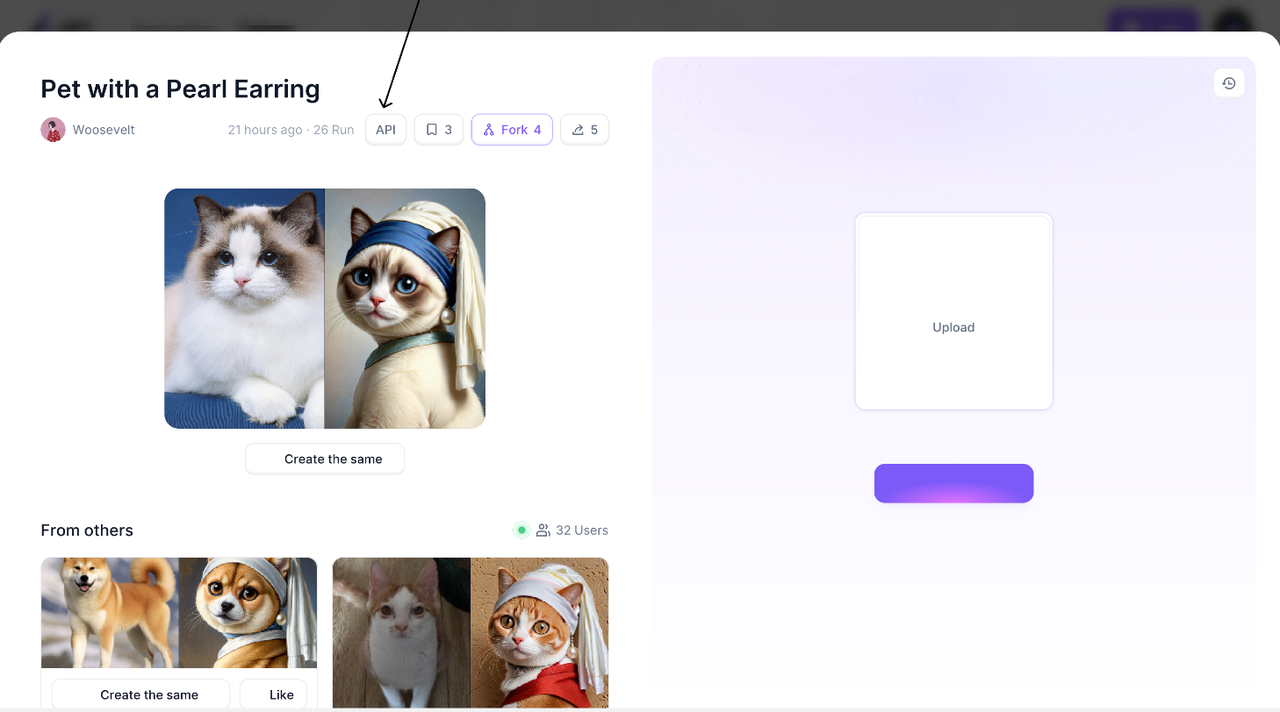
1. **Get APP information:** APP information can be browsed through the web application details page - API pop-up window, or obtained through the API interface to understand the basic information and imported parameters of the APP.\

2. **Upload image interface** : if the user is using the image generation function, you need to call this interface to upload images before you can get the parameters of the image generation dependency
3. **Image/Video Generation Interface:** Users input the parameters on which the image/video generation depends, and can obtain a taskId. Through the taskId, the generated image/video results can be queried.
4. **Fine drawing interface:** high definition processing of the incoming image, similar to the raw image interface, after obtaining the taskId, the raw image result can be queried through the taskId
5. **Query raw graph result interface:** pass in the taskId can query the raw graph result
## Basic introduction
### Access authorization
#### Prefix
`https://a1.art`
Note: If you encounter problems with registration in China, you can try using the domain name `https://a1art.xiaopiu.com`
#### Request specification
* Network protocol: `HTTPS`protocol.
* Encoding format: `UTF-8`encoding.
* Request header: You must carry `apiKey` for background authentication and authentication. [(Get API key)](https://a1.art?open=apikey)
* Response result: `JSON` data format. The response body structure of the API includes four parts: `code, msg, msg_cn, and data`. `Code` is the error code, `msg` is the English error description, `msg_cn` is the Chinese error description, and `data` is the result returned after calling the API; if the `code` is not `0` , the request is considered to have failed, and the failure information can refer to `msg` and `msg_cn` .
#### **Response body**
| **Parameter name** | **Type** | **Description** |
| ------------------ | -------- | --------------------- |
| code | int | Error code |
| msg | string | English Error Message |
| msg\_cn | string | Chinese Error Message |
| data | json | Response data |
### Data structure
#### Application
```javascript
export type APPInfo = {
id: string;
versionId: string;
name: string;
formArr: []Form;
styleArr: []Style;
updateDate: Date;
createDate: Date;
processTime: string;
};
```
#### Form
```javascript
// Type of the type field in the formCorresponding style, pictures, text, size
export type FormItemTypeFieldType = 'style' | 'cnet' | 'description' | 'size' ;
export type Form = {
id: string; // The id that needs to be passed for the image generation interface (except for descriptions with inputs).
type: FormItemTypeFieldType;
title: string;
inputs: []Input;
position: string; // Location of the group photo
};
```
#### Input
```javascript
export type Input = {
id: string; // The id that needs to be passed in the description form of the image generation interface
title: string;
tags: []string; // description form prompt
};
```
#### Style
```javascript
export type Style = {
id: string;
name: string;
image: string;
};
```
#### Size
```javascript
// Types of sizeId field in form: 1-7 pairs corresponding to size 1:1, 3:4, 1:2, 4:3, 2:1, 16:9, 9:16
export type FormSizeIdType = '1' | '2' | '3' | '4' | '5' | '6' | '7' ;
```
#### Task
```javascript
// Task execution status, 0 - task has been submitted, 10 - task has been completed, 20 - task failed, 30 - task in progress.
export type TaskStateType = 0 |10 | 20 | 30 ;
export type Task = {
id: string;
startDate: Date;
finishDate: Date;
createDate: Date;
images: []string;
state: number;
};
```
### `API key`
To issue an authorization request as a user, you must use the API key. After logging in to a1, click API Manage to find and manage your API key
 
### `Application`
#### Get Application Details
`/open-api/v1/a1/apps/{appId}`& GET
**Request Parameters**
| Field Name | Type | Location | Is Mandatory | Meaning |
| ---------- | ------ | -------- | ------------ | ---------------------------------------------------------------------------------------------------------------------------------------------------------------------------------------------------------------------- |
| apiKey | string | header | Yes | API key |
| appId | string | path | Yes | Application ID |
| language | string | query | No | Language, if not transmitted, it is assumed to be the text used when publishing. Supported translations include zh\_CN, en\_US, zh\_TW, ru\_RU, ja\_JP, pt\_BR, es\_MX, de\_DE, id\_ID, tr\_TR, vi\_VN, th\_TH, ms\_MY |
**Parameter limit**
* It does not support querying apps with digital avatar components, wordart components, group photo components in user upload mode (most group photo apps are not included in this scope), and video components
* It does not support querying unpublished node app information
{% tabs %}
{% tab title="Curl" %}
```sh
curl --location --request GET 'https://a1.art/open-api/v1/a1/apps/{appId}' \
--header 'apiKey: {apiKey}' \
--header 'Accept: */*' \
--header 'Host: a1.art' \
--header 'Connection: keep-alive'
```
{% endtab %}
{% tab title="Python" %}
```python
import requests
url = "https://a1.art/open-api/v1/a1/apps/{appId}"
payload={}
headers = {
'apiKey': {apiKey}
}
response = requests.request("GET", url, headers=headers, data=payload)
print(response.text)
```
{% endtab %}
{% tab title="JavaScript" %}
```javascript
var axios = require('axios');
var config = {
method: 'get',
url: 'https://a1.art/open-api/v1/a1/apps/{appId}',
headers: {
'apiKey': {apiKey},
'Accept': '*/*',
'Host': 'a1.art',
'Connection': 'keep-alive'
}
};
axios(config)
.then(function (response) {
console.log(JSON.stringify(response.data));
})
.catch(function (error) {
console.log(error);
});
```
{% endtab %}
{% endtabs %}
**Response example**
```javascript
{
"code": 0,
"msg": "success",
"msg_cn": "成功",
"data": {
"appInfo": {
"id": "1803632078862147586",
"versionId": "1803632078866341890",
"name": "Crazy Pet",
"formArr": [ // Form parameters for raw images to be uploaded
{
"id": "1705408562085",
"type": "cnet",
"title": "Photo of your pet",
"position": "0"
},
{
"id": "1705403286130",
"type": "description",
"title": "Description",
"inputs": [
{
"id": "description_1705463790428_variant1",
"title": "Color and breed, such as: black devon rex cat",
"tags": [
"Obsidian_black",
"Porcelain_white"
]
}
]
},
{
"id": "1705398050190",
"type": "style",
"title": "Style"
},
{
"id": "1705403291444",
"type": "size",
"title": "Size"
}
],
"styleArr": [
{
"id": "1766068889598496769",
"name": "High Quality Anmie",
"image": "https://cdn.a1.art/assets/style/cover_image/6d7358e9-ddae-4253-bcc9-d4f54ebc25d5.png"
}
],
"updateDate": "2024-06-20 19:51:55.0",
"createDate": "2024-06-20 11:32:52.0",
"processTime": "22", // The average time it takes to generate images in this app recently
"cost": 2 // Node app consumption credits
}
}
}
```
### `Image`
#### Upload images:`/open-api/v1/a1/images/upload`& POST
Note: Only images uploaded through our system can be used as raw image parameters.
**Request Parameters**
| Field Name | Type | Location | Is Mandatory | Meaning |
| ---------- | ------ | --------- | ------------ | ---------- |
| apiKey | string | header | yes | API key |
| file | file | form-data | yes | Image file |
| imageUrl | string | form-data | yes | Image Link |
**Parameter limit**
* Only png, jpg and jpeg image files can be uploaded.
* Only images can be uploaded through form forms.
* Support uploading pictures via online picture links
* Only one image can be uploaded at a time
* Image file size cannot be greater than 10 MB
**Request example**
{% tabs %}
{% tab title="Curl" %}
```
curl --location --request POST 'https://a1.art/open-api/v1/a1/images/upload' \
--header 'apiKey: {apiKey}' \
--header 'Accept: */*' \
--header 'Host: a1.art' \
--header 'Connection: keep-alive' \
--header 'Content-Type: multipart/form-data;' \
--form 'file=@"/Users/xxx/Downloads/imageName.png"' \
--form 'imageUrl="https://xxx/xxx.jpeg"'
```
{% endtab %}
{% tab title="Python" %}
```
import requests
url = "https://a1.art/open-api/v1/a1/images/upload"
payload={
'imageUrl': 'https://xxx/xxx.jpeg'
}
files=[
('file',('imageName.jpg',open('/Users/xxx/Downloads/imageName.jpg','rb'),'image/jpeg'))
]
headers = {
'apiKey': {apiKey}
}
response = requests.request("POST", url, headers=headers, data=payload, files=files)
print(response.text)
```
{% endtab %}
{% tab title="JavaScript" %}
```java
var axios = require('axios');
var FormData = require('form-data');
var fs = require('fs');
var data = new FormData();
data.append('file', fs.createReadStream('/Users/xxx/Documents/iamgeName'));
data.append('imageUrl', 'https://xxx/xxx.jpeg');
var config = {
method: 'post',
url: 'https://a1.art/open-api/v1/a1/images/upload',
headers: {
'apiKey': {apiKey},
'Accept': '*/*',
'Host': 'a1.art',
'Connection': 'keep-alive',
...data.getHeaders()
},
data : data
};
axios(config)
.then(function (response) {
console.log(JSON.stringify(response.data));
})
.catch(function (error) {
console.log(error);
});java
```
{% endtab %}
{% endtabs %}
**Response example**
```javascript
{
"code": 0,
"msg": "success",
"msg_cn": "成功",
"data": {
"imageUrl": "63fa41e7-e282-4582-a07b-8e5e73e8d388.jpg",
"path": "assets/application/apikey_5f6ccf7b983e499fb8ba4e5c4de8013f/form/"
}
}
```
#### Generate images/videos
`/open-api/v1/a1/images/generate`**& POST**
> Note:
>
> 1. Node-based applications have separate credit consumption rules. For details, please refer to [节点式应用 VS 表单式应用](https://fyze31atzb.feishu.cn/docx/H2aKdptrHotppqx3N7GcmV7Vnob)
> 2. Generating one video consumes 10 credits.
**Request Parameters**
| Field Name | Type | Location | Is Mandatory | Meaning |
| ----------------------------------------------- | ------------------ | -------- | ------------ | ------------------------------------------------------------------------------------------------------------------------------------------------------------------------------------------------------------------- |
| apiKey | string | header | Yes | API key |
| appId | string | body | Yes | Application id |
| versionId | string | body | Yes | Application version id |
| generateNum | string | body | Yes | Number of images to be generated in this request |
| cnet | \[]cnetForm | body | No | \| Pictures relied on for Image-to-image \| |
| [cnetForm.id](http://cnetForm.id) | string | body | Yes | id of the form of type cnet in formArr |
| cnetForm.imageUrl | string | body | Yes | See the return value of the upload image interface |
| cnetForm.path | string | body | Yes | See the return value of the upload image interface |
| cnetForm.position | string | body | No | Group photo image index position (this field must be passed when using the group photo function, indicating that the image will be attached to the specified position of the group photo - the index starts from 0) |
| description | \[]descriptionForm | body | No | Descriptors relying on real-life photos |
| [descriptionForm.id](http://descriptionForm.id) | string | body | Yes | id of the form of type description in formArr (if there is an input field, it is the id of the input) |
| descriptionForm.value | string | body | Yes | Description words |
| styleId | string | body | No | The image style of the raw image depends on the source - the id in styleArr. |
| size | sizeForm | body | No | Original image size dependencies |
| sizeForm.sizeId | string | body | Yes | 1 to 7 pairs corresponding to size 1:1 3:4 1:2 4:3 2:1 16:9 9:16 |
**Parameter limit**
* You need to bring the latest versionId of the application.
* Currently, generating images with unpublished node-based applications and video face swapping applications are not supported.
* Images stored in this system must be used
* Number of images/videos to be generated (generateNum=1) Note: Node-based applications can only generate one image/video at a time
* For the parameters in application formArr, pass at least one parameter for each type
* When passing a parameter of type description in the form, if the form has an inputs field, the id of the description should be passed as the id of the input
**Request example**
{% tabs %}
{% tab title="Curl" %}
```sh
curl --location --request POST 'https://a1.art/open-api/v1/a1/images/generate' \
--header 'apiKey: {apiKey}' \
--header 'Content-Type: application/json' \
--header 'Accept: */*' \
--header 'Host: a1.art' \
--header 'Connection: keep-alive' \
--data-raw '{
"cnet": [
{
"id": {cnetId},
"imageUrl": {imageUrl},
"path": {path},
"position": {position}
}
],
"description": [
{
"id": {descriptionId/inputId}, # If the form does not have an inputs field, pass the description id instead of the input id.
"value": {value}
}
],
"styleId": {styleId},
"size": {
"sizeId": {sizeId}
},
"appId": {appId},
"versionId": {versionId},
"generateNum": {generateNum}
}'
```
{% endtab %}
{% tab title="Python" %}
```python
import requests
import json
url = "https://a1.art/open-api/v1/a1/images/generate"
payload = json.dumps({
"cnet": [
{
"id": {cnetId},
"imageUrl": {imageUrl},
"path": {path},
"position": {position}
}
],
"description": [
{
"id": {descriptionId/inputId}, # If the form does not have an inputs field, pass the description id instead of the input id.
"value": {value}
}
],
"styleId": {styleId},
"size": {
"sizeId": {sizeId}
},
"appId": {appId},
"versionId": {versionId},
"generateNum": {generateNum}
})
headers = {
'apiKey': {apiKey},
'Content-Type': 'application/json',
'Accept': '*/*',
'Host': 'a1.art',
'Connection': 'keep-alive'
}
response = requests.request("POST", url, headers=headers, data=payload)
print(response.text)
```
{% endtab %}
{% tab title="JavaScript" %}
```javascript
var axios = require('axios');
var data = JSON.stringify({
"cnet": [
{
"id": {cnetId},
"imageUrl": {imageUrl},
"path": {path},
"position": {position}
}
],
"description": [
{
"id": {descriptionId/inputId}, // If the form does not have an inputs field, pass the description id instead of the input id.
"value": {value}
}
],
"styleId": {styleId},
"size": {
"sizeId": {sizeId}
},
"appId": {appId},
"versionId": {versionId},
"generateNum": {generateNum}
});
var config = {
method: 'post',
url: 'https://a1.art/open-api/v1/a1/images/generate',
headers: {
'apiKey': {apiKey},
'Content-Type': 'application/json',
'Accept': '*/*',
'Host': 'a1.art',
'Connection': 'keep-alive'
},
data : data
};
axios(config)
.then(function (response) {
console.log(JSON.stringify(response.data));
})
.catch(function (error) {
console.log(error);
});
```
{% endtab %}
{% endtabs %}
**Response example**
```javascript
{
"code": 0,
"msg": "success",
"msg_cn": "成功",
"data": {
"taskId": "507b080cfe17f7956e8690c4eba2b80f"
}
}
```
#### **Enchance Image:/open-api/v1/a1/images/optimize& POST**
1. **Request Parameters**
| Field Name | Type | Location | Is Mandatory | Meaning |
| ---------- | ------ | -------- | ------------ | --------------------------------------------- |
| apiKey | string | header | Yes | API key |
| path | string | body | Yes | See the return value of the upload image API. |
| imageUrl | string | body | Yes | See the return value of the upload image API. |
2. **Parameter limit**
* You must use images stored in this system
* Each image drawing consumes 3 points
* The size limit of the drawing image is 2048 \* 2048
3. **Request example**
{% tabs %}
{% tab title="Curl" %}
```sh
curl --location --request POST 'https://a1.art/open-api/v1/a1/images/optimize' \
--header 'apiKey: {apiKey}' \
--header 'Content-Type: application/json' \
--header 'Accept: */*' \
--header 'Host: a1.art' \
--header 'Connection: keep-alive' \
--data-raw '{
"path": {path},
"imageUrl": {imageUrl}
}'
```
{% endtab %}
{% tab title="Python" %}
```python
import requests
import json
url = "https://a1.art/open-api/v1/a1/images/optimize"
payload = json.dumps({
"path": {path},
"imageUrl": {imageUrl}
})
headers = {
'apiKey': {apiKey},
'Content-Type': 'application/json',
'Accept': '*/*',
'Host': 'a1.art',
'Connection': 'keep-alive'
}
response = requests.request("POST", url, headers=headers, data=payload)
print(response.text)
```
{% endtab %}
{% tab title="JavaScript" %}
```javascript
var axios = require('axios');
var data = JSON.stringify({
"path": {path},
"imageUrl": {imageUrl}
});
var config = {
method: 'post',
url: 'https://a1.art/open-api/v1/a1/images/optimize',
headers: {
'apiKey': {apiKey},
'Content-Type': 'application/json',
'Accept': '*/*',
'Host': 'a1.art',
'Connection': 'keep-alive'
},
data : data
};
axios(config)
.then(function (response) {
console.log(JSON.stringify(response.data));
})
.catch(function (error) {
console.log(error);
});
```
{% endtab %}
{% endtabs %}
4. **Response example**
> The response structure is the same as the generated image
```sh
{
"code": 0,
"msg": "success",
"msg_cn": "成功",
"data": {
"taskId": "507b080cfe17f7956e8690c4eba2b80f"
}
}
```
### `Task`
`/open-api/v1/a1/tasks/{taskId}`**& GET**
> Note: The generated image address may become invalid later. It is recommended to save the generated result on your own CDN.
Note:
1. You can wait for 5 seconds and then query the result through polling
2. The state enum of task can be seen in TaskStateType
#### Query task execution results
**Request Parameters**
| Field Name | Type | Location | Is Mandatory | Meaning |
| ---------- | ------ | -------- | ------------ | -------------------------------------------------------------------------------------------------------------- |
| apiKey | string | header | Yes | API key |
| section | string | header | No | The region to which the image resource belongs. For China, please use cn. Other regions do not need to use cn. |
| taskId | string | path | Yes | taskId returned by the generate image interface |
**Parameter limit**
* Only query tasks under the current user ID
**Request example**
{% tabs %}
{% tab title="Curl" %}
```sh
curl --location --request GET 'https://a1.art/open-api/v1/a1/tasks/{taskId}' \
--header 'apiKey: {apiKey}' \
--header 'section: {section}' \
--header 'Accept: */*' \
--header 'Host: a1.art' \
--header 'Connection: keep-alive'
```
{% endtab %}
{% tab title="Python" %}
```python
import requests
url = "https://a1.art/open-api/v1/a1/tasks/{taskId}"
payload={}
headers = {
'apiKey': {apiKey},
'section': {section}
}
response = requests.request("GET", url, headers=headers, data=payload)
```
{% endtab %}
{% tab title="JavaScript" %}
```javascript
var axios = require('axios');
var config = {
method: 'get',
url: 'https://a1.art/open-api/v1/a1/tasks/{taskId}',
headers: {
'apiKey': {apiKey},
'section': {section},
'Accept': '*/*',
'Host': 'a1.art',
'Connection': 'keep-alive'
}
};
axios(config)
.then(function (response) {
console.log(JSON.stringify(response.data));
})
.catch(function (error) {
console.log(error);
});
```
{% endtab %}
{% endtabs %}
**Response example**
```javascript
{
"code": 0,
"msg": "success",
"msg_cn": "成功",
"data": {
"id": "1803970662304264194",
"state": 10,
"startDate": "2024-06-21 09:58:16.0",
"finishDate": "2024-06-21 09:58:28.0",
"createDate": "2024-06-21 09:58:16.0",
"images": [
"imageUrl"
]
}
}
```
## Error code
| **code** | **msg** | **msg\_cn** |
| -------- | -------------------------------------------------------------------------------- | ----------------------- |
| 0 | success | 成功 |
| 10001 | invalid params | 无效的参数 |
| 10002 | unsupported image suffix | 不支持的文件后缀 |
| 10410 | Missing API key | 缺少API key |
| 10411 | Invalid API key | 无效的API key |
| 20000 | too may request | 接口访问触发限流 |
| 20002 | server error | 服务器错误 |
| 20003 | service internal error | 服务内部错误 |
| 20100 | file error | 文件异常 |
| 20101 | file suffix error | 文件后缀异常 |
| 324010 | This app does not support API access | 此应用不支持通过API访问 |
| 324011 | The quantity must not exceed 4 | 单个应用单次请求生图数量1~4张 |
| 324012 | This app does not exist | 无效的应用ID |
| 324013 | The application is updated. You need to obtain the application information again | 应用版本已更新,请重新获取应用信息 |
| 324018 | You can only use API of your built apps. | 调用他人的未发布应用api |
| 400000 | Missing image file | 缺少图片文件 |
| 400001 | Only one image can be uploaded at a time | 一次只支持上传一张图片 |
| 400002 | Non image format files are not supported | 不支持非图片格式文件 |
| 400003 | The image file cannot exceed 10M | 图片文件不能超过10M |
| 400004 | Invalid file | 无效的文件 |
| 400005 | This image format is not supported | 不支持该图片格式 |
| 400006 | The size of the image file cannot exceed 2048\*2048 | 图片文件尺寸不能超过 2048\*2048 |
| 324019 | No rights to use VIP app\*Available after payment | 没有使用 vip app 的权益\*付费后可用 |
| 810012 | balance insufficient error | 账户余额不足 |
## Contact us
* Join our Discord community to communicate with our team and get quick assistance with your issues.
* For any questions, send us an email at [**contact@A1.art**](mailto:contact@A1.art), and we will respond within 2 business days.
* Follow our X account: [**@A1.art**](https://twitter.com/A1art280841)
# 中文版
## **简介**
{% hint style="success" %}
欢迎加入A1的开发者平台,共同探索AIGC的无限可能!
{% endhint %}
a1.art 致力于提供多种图像及视频生成应用程序,帮助开发者轻松集成并使用图像或视频生成技术,以满足不同的业务需求。
a1.art平台已经推出了超过 45,000+ 影像生成应用,包括视频换脸、动漫头像、3D 卡通形象、吉卜力风格插画等热门玩法,极具特色的 Action Figure 玩偶风、情侣合照模板、氛围感写真等 AI 人像应用,以及海量创意表情包、艺术字体等,输入一张图或者一句话就可以生成风格各异的精美图片或者视频内容。等待你去探索!
\
通过调用我们的 API,您可以快速将这些 APP/滤镜 集成到您的应用程序或服务中,满足不同业务需求,提升用户体验和产品价值。
\
我们的平台特点包括:
* **多样化的生图及视频应用**:提供多种图像及视频生成应用,满足不同场景的需求。
* **易于集成**:通过简单的API调用,即可将强大的图像及视频生成功能集成到您的项目中。
* **高效的性能**:优化的算法和服务器架构,确保快速响应和高质量的图像及视频输出。
* **灵活的定制**:支持多种参数设置,满足个性化的图像及视频生成需求。
无论您是想为您的用户提供个性化的图像或视频生成服务,还是需要在内部系统中自动生成图像或视频,我们的平台都能为您提供强大的支持。
## API收费规则
API接口将为您生成无水印图或视频,便于您将图片或视频应用于个人业务中。a1.art 提供两类生成应用:表单式应用与节点式应用。
* 调用 APP 的 API 进行生图,表单应用每生成一张图消耗1积分,节点式应用按照节点个数进行积分扣除,精绘图片每生成一张消耗3积分,详情可参考:[节点式应用 VS 表单式应用](https://fyze31atzb.feishu.cn/docx/H2aKdptrHotppqx3N7GcmV7Vnob#share-QZB1dYeYRoO5kLxibaLc5R6Znff)
* 调用图生视频API生成视频,每生成一个视频消耗10积分
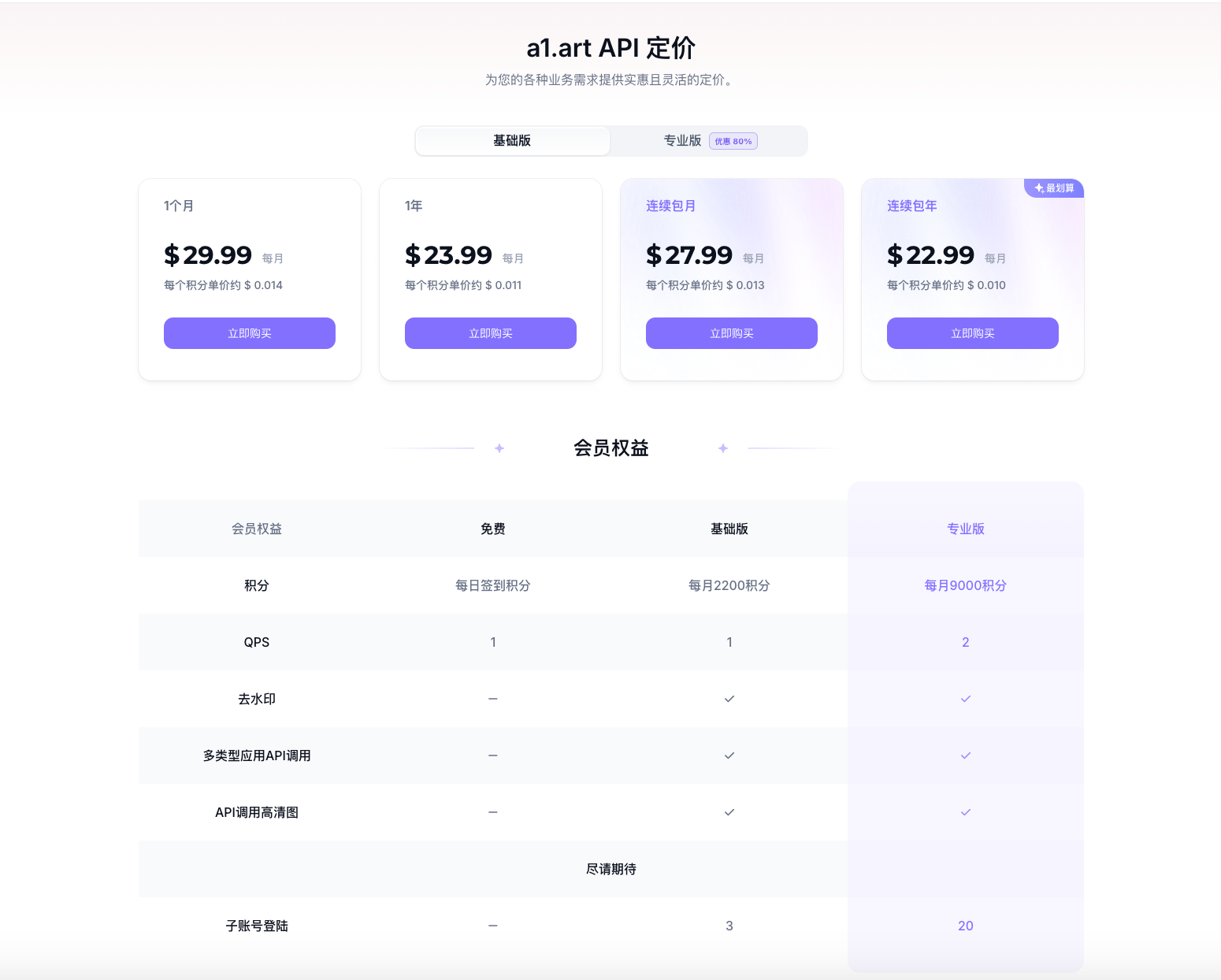
您可以通过Visa卡/微信订阅a1.art获取点数,或直接联系我们讨论设置自定义计划。



.PNG?alt=media&token=0de26558-5e8a-4d2f-99c0-24d9a9803931)
.PNG?alt=media&token=f75ff969-1533-44dc-8f2c-7f85710b2e0f)
.PNG?alt=media&token=b68f77f2-d161-47bc-89d3-2344d9ed9c9e)
.PNG?alt=media&token=9762551d-dfd9-4d21-965a-a1975f27fb5d)
.PNG?alt=media&token=2882dbcd-0e12-4412-a4c1-5aa091d0a981)
.PNG?alt=media&token=8e9334b6-b728-4e34-887d-b1e59759fb0e)
.PNG?alt=media&token=266bd4af-9102-4cc9-b9a1-a78b433f5148)
.PNG?alt=media&token=69e53b64-6b97-4414-9909-4744beb8f1e1)

.PNG?alt=media&token=9dafe087-8964-4fe3-8e9d-f8c61abc10b2)
.PNG?alt=media&token=ab3cb3c0-76f5-47ba-88e8-434d5b6da8b0)


.PNG?alt=media&token=83810832-0619-4557-a3de-258ae22ccf10)
.PNG?alt=media&token=ff614381-3c25-4d78-811a-bc597279c0dc)
.PNG?alt=media&token=a54586cf-81a9-4856-a5d7-bc0793c495a2)
.PNG?alt=media&token=9b89557c-99c3-4c7c-a5e1-033f05fcd052)
.PNG?alt=media&token=4fe36ecc-9f02-4364-a7b5-f3d2a9ad37c4)
.PNG?alt=media&token=ca1ed4d0-ba6e-46a1-9210-67f87685e527)
.PNG?alt=media&token=fb3b9033-c27e-4083-b819-1ada1870829c)
.PNG?alt=media&token=6dbd72ca-02ca-4138-be82-9b857d2bc452)
.PNG?alt=media&token=789368b5-379e-47d4-92a7-c4479cc46ca1)

.PNG?alt=media&token=43e8fc36-aea5-4434-bec3-ffd4076a60cf)
.PNG?alt=media&token=47e871fe-9744-4e97-801d-ffd8f31235d6)
.PNG?alt=media&token=9867af18-6b1b-4588-89ca-4440bd866329)
.PNG?alt=media&token=c51b5ccd-df05-4aac-b5df-5ea7784db510)


.png?alt=media&token=f2bafe7d-beb8-4a70-ac84-064427cdca74)


.png?alt=media&token=60c4b375-2352-469f-bd7d-1c33d9744072)


* **上传图片接口**:如果用户在使用图生图功能时,需要先调此接口上传图片后才可拿到生图依赖的参数
* **生图/视频接口:**用户传入生图/视频依赖的参数,可以得到一个 taskId ,通过 taskId 可以查询到生图结果
* **精绘接口:**对传入的图片进行高清处理,类似于生图接口,得到 taskId 后,通过 taskId 可以查询到生图结果
* **查询生图结果接口:**传入 taskId 可以查询到生图结果
## 基础介绍
### 访问授权
#### Prefix
`https://a1.art`
注:中国境内遇到备案问题可以尝试使用域名[`https://a1art.xiaopiu.com`](https://a1art.xiaopiu.com)
### 请求规范说明
* 网络协议:`HTTPS`协议。
* 编码格式:`UTF-8`编码。
* 请求头部:必须需要携带`apiKey`[(获取API key)](https://a1.art?open=apikey),用于后台的认证与鉴权。
* 响应结果:`JSON`数据格式。API 的响应体结构包含`code、msg、msg_cn、data`四个部分。`code`为错误码,`msg` 为英文错误说明,`msg_cn`为中文错误说明,`data`为调用 API 后返回的结果;如果`code` 不为`0`则认为请求失败,失败信息可参考`msg`和`msg_cn`。
#### **响应体**
| **参数名** | **类型** | **描述** |
| ------- | ------ | ------ |
| code | int | 错误码 |
| msg | string | 英文错误信息 |
| msg\_cn | string | 中文错误信息 |
| data | json | 响应数据 |
### 数据结构
#### Application
```javascript
export type APPInfo = {
id: string;
versionId: string;
name: string;
formArr: []Form;
styleArr: []Style;
updateDate: Date;
createDate: Date;
processTime: string; // 该app最近生图的平均耗时
};
```
#### Form
```javascript
// form中的type字段的类型,对应风格、图片、文本、尺寸
export type FormItemTypeFieldType = 'style' | 'cnet' | 'description' | 'size' ;
export type Form = {
id: string; // 生图接口需传的id(带有inputs的description除外)
type: FormItemTypeFieldType;
title: string;
inputs: []Input;
position: string; // 合照图片的位置
};
```
#### Input
```javascript
export type Input = {
id: string; // 生图接口description表单需传的id
title: string;
tags: []string; // description表单提示词
};
```
#### Style
```javascript
export type Style = {
id: string;
name: string;
image: string;
};
```
#### Size
```javascript
// form中的sizeId字段的类型,1到7对分别对应的size 1:1 3:4 1:2 4:3 2:1 16:9 9:16
export type FormSizeIdType = '1' | '2' | '3' | '4' | '5' | '6' | '7' ;
```
#### Task
```javascript
// task 执行状态,0—任务已提交 10-任务已完成 20-任务失败 30-任务进行中
export type TaskStateType = 0 |10 | 20 | 30 ;
export type Task = {
id: string;
startDate: Date;
finishDate: Date;
createDate: Date;
images: []string;
state: number;
};
```
### `API key`
要以用户身份发出授权请求,您必须使用 API key,您可以登陆a1之后,点击API Manage,查找并管理您的 API key
 .png?alt=media\&token=7c4bb234-f2bb-4bee-a128-d3d13cc1814c)
### `Application`
#### 获取Application详情
`/open-api/v1/a1/apps/{appId}` \&GET
**请求参数**
| 字段名 | 类型 | 位置 | 是否必传 | 含义 |
| -------- | ------ | ------ | ---- | ---------------------------------------------------------------------------------------------------------------- |
| apiKey | string | header | 是 | API key |
| appId | string | path | 是 | 应用id |
| language | string | query | 否 | 语言,不传默认为发布时使用的文案,支持翻译为zh\_CN,en\_US,zh\_TW,ru\_RU,ja\_JP,pt\_BR,es\_MX,de\_DE,id\_ID,tr\_TR,vi\_VN,th\_TH,ms\_MY |
**参数限制**
* 不支持查询带有数字分身组件、wordart组件、group photo组件为 user upload模式(绝大多数合照应用不再此范围内)、Video组件的app
* 不支持查询未发布的节点式应用信息
**请求示例**
{% tabs %}
{% tab title="Curl" %}
```sh
curl --location --request GET 'https://a1.art/open-api/v1/a1/apps/{appId}' \
--header 'apiKey: {apiKey}' \
--header 'Accept: */*' \
--header 'Host: a1.art' \
--header 'Connection: keep-alive'
```
{% endtab %}
{% tab title="Python" %}
```python
import requests
url = "https://a1.art/open-api/v1/a1/apps/{appId}"
payload={}
headers = {
'apiKey': {apiKey}
}
response = requests.request("GET", url, headers=headers, data=payload)
print(response.text)
```
{% endtab %}
{% tab title="JavaScript" %}
```javascript
var axios = require('axios');
var config = {
method: 'get',
url: 'https://a1.art/open-api/v1/a1/apps/{appId}',
headers: {
'apiKey': {apiKey},
'Accept': '*/*',
'Host': 'a1.art',
'Connection': 'keep-alive'
}
};
axios(config)
.then(function (response) {
console.log(JSON.stringify(response.data));
})
.catch(function (error) {
console.log(error);
});
```
{% endtab %}
{% endtabs %}
**响应示例**
```json
{
"code": 0,
"msg": "success",
"msg_cn": "成功",
"data": {
"appInfo": {
"id": "1803632078862147586",
"versionId": "1803632078866341890",
"name": "Crazy Pet",
"formArr": [ // 生图待传的表单参数
{
"id": "1705408562085",
"type": "cnet",
"title": "Photo of your pet",
"position": "0"
},
{
"id": "1705403286130",
"type": "description",
"title": "Description",
"inputs": [
{
"id": "description_1705463790428_variant1",
"title": "Color and breed, such as: black devon rex cat",
"tags": [
"Obsidian_black",
"Porcelain_white"
]
}
]
},
{
"id": "1705398050190",
"type": "style",
"title": "Style"
},
{
"id": "1705403291444",
"type": "size",
"title": "Size"
}
],
"styleArr": [
{
"id": "1766068889598496769",
"name": "High Quality Anmie",
"image": "https://cdn.a1.art/assets/style/cover_image/6d7358e9-ddae-4253-bcc9-d4f54ebc25d5.png"
}
],
"updateDate": "2024-06-20 19:51:55.0",
"createDate": "2024-06-20 11:32:52.0",
"processTime": "22", // 该app最近生图的平均耗时
"cost": 2 // 节点式应用消耗点数
}
}
}
```
### `Image`
#### 上传图片:`/open-api/v1/a1/images/upload`& POST
注:只有通过我们系统上传的图片才可用来做生图参数
**请求参数**
| 字段名 | 类型 | 位置 | 是否必传 | 含义 |
| -------- | ------ | --------- | ------------ | ------- |
| apiKey | string | header | 是 | API key |
| file | file | form-data | 与imageUrl传其一 | 图片文件 |
| imageUrl | string | form-data | 与file传其一 | 图片链接 |
**参数限制**
* 仅支持上传png、jpg、jpeg格式的图片文件
* 支持通过 form 表单的形式上传图片
* 支持通过在线图片链接的方式上传图片
* 每次仅可上传一张图片
* 图片文件大小不可大于10 M
**请求示例**
{% tabs %}
{% tab title="Curl" %}
```sh
curl --location --request POST 'https://a1.art/open-api/v1/a1/images/upload' \
--header 'apiKey: {apiKey}' \
--header 'Accept: */*' \
--header 'Host: a1.art' \
--header 'Connection: keep-alive' \
--header 'Content-Type: multipart/form-data;' \
--form 'file=@"/Users/xxx/Downloads/imageName.png"' \
--form 'imageUrl="https://xxx/xxx.jpeg"'
```
{% endtab %}
{% tab title="Python" %}
```python
import requests
url = "https://a1.art/open-api/v1/a1/images/upload"
payload={
'imageUrl': 'https://xxx/xxx.jpeg'
}
files=[
('file',('imageName.jpg',open('/Users/xxx/Downloads/imageName.jpg','rb'),'image/jpeg'))
]
headers = {
'apiKey': {apiKey}
}
response = requests.request("POST", url, headers=headers, data=payload, files=files)
print(response.text)
```
{% endtab %}
{% tab title="JavaScript" %}
```javascript
var axios = require('axios');
var FormData = require('form-data');
var fs = require('fs');
var data = new FormData();
data.append('file', fs.createReadStream('/Users/xxx/Documents/iamgeName'));
data.append('imageUrl', 'https://xxx/xxx.jpeg');
var config = {
method: 'post',
url: 'https://a1.art/open-api/v1/a1/images/upload',
headers: {
'apiKey': {apiKey},
'Accept': '*/*',
'Host': 'a1.art',
'Connection': 'keep-alive',
...data.getHeaders()
},
data : data
};
axios(config)
.then(function (response) {
console.log(JSON.stringify(response.data));
})
.catch(function (error) {
console.log(error);
});
```
{% endtab %}
{% endtabs %}
**响应示例**
```json
{
"code": 0,
"msg": "success",
"msg_cn": "成功",
"data": {
"imageUrl": "63fa41e7-e282-4582-a07b-8e5e73e8d388.jpg",
"path": "assets/application/apikey_5f6ccf7b983e499fb8ba4e5c4de8013f/form/"
}
}
```
#### 生成图片/视频:**`/open-api/v1/a1/images/generate`& POST**
> 注:
>
> 1. 节点式应用有单独的点数消耗规则,详情请参照 [节点式应用 VS 表单式应用](https://fyze31atzb.feishu.cn/docx/H2aKdptrHotppqx3N7GcmV7Vnob)
> 2. 生成1个视频消耗10积分
**请求参数**
| 字段名 | 类型 | 位置 | 是否必传 | 含义 |
| ----------------------------------------------- | ------------------ | ------ | ---- | --------------------------------------------------------------------------- |
| apiKey | string | header | 是 | API key |
| appId | string | body | 是 | 应用id |
| versionId | string | body | 是 | 应用版本 id (如果遇到“应用版本已更新,请重新获取应用信息”的报错,则代表应用已经更新,需要重新获取一下) |
| generateNum | string | body | 是 | 本次请求生成图片/视频的数量 |
| cnet | \[]cnetForm | body | 否 | 图生图、图生视频依赖的图片(如果查询 app 详情接口没返回才不用填,代表这个应用不需要输入图片) |
| [cnetForm.id](http://cnetForm.id) | string | body | 是 | formArr 中 type 为 cnet 的 form 的 id |
| cnetForm.imageUrl | string | body | 是 | 见上传图片接口的返回值 |
| cnetForm.path | string | body | 是 | 见上传图片接口的返回值 |
| cnetForm.position | string | body | 否 | 合照图片索引位置 (用到合照功能需传该字段,表示将图片附于合照指定位置-索引从0开始) |
| description | \[]descriptionForm | body | 否 | 生图/视频依赖的描述词(如果查询 app 详情接口没返回才不用填,代表这个应用没有开放描述词输入) |
| [descriptionForm.id](http://descriptionForm.id) | string | body | 是 | formArr 中 type 为 description 的 form 的 id(如果有inputs字段的话则为input的id) |
| descriptionForm.value | string | body | 是 | 描述词 |
| styleId | string | body | 否 | 生图/视频依赖的图片风格,来源— styleArr 中的id(如果查询 app 详情接口没返回才不用填,代表这个应用只能生成固定 style 的图片) |
| size | sizeForm | body | 否 | 生图/视频依赖的图片尺寸;(如果查询 app 详情接口没返回才不用填,代表这个应用只能生成固定尺寸的图片) |
| sizeForm.sizeId | string | body | 是 | 1到7对分别对应的size 1:1 3:4 1:2 4:3 2:1 16:9 9:16 |
**参数限制**
* 需要带上application最新的versionId
* 暂不支持使用未发布的节点式应用生图、视频换脸生视频
* 必须使用本系统存储的图片
* 需要传图片/视频生成数量(generateNum=1)注:节点式应用单次仅能生成一张图/视频
* 对于application formArr 里面的参数,每个type的参数至少传一个
* 在传form里面类型为description的参数时,如果form拥有inputs字段,description的id则应该传input的id
**请求示例**
{% tabs %}
{% tab title="Curl" %}
```sh
curl --location --request POST 'https://a1.art/open-api/v1/a1/images/generate' \
--header 'apiKey: {apiKey}' \
--header 'Content-Type: application/json' \
--header 'Accept: */*' \
--header 'Host: a1.art' \
--header 'Connection: keep-alive' \
--data-raw '{
"cnet": [
{
"id": {cnetId},
"imageUrl": {imageUrl},
"path": {path},
"position": {position}
}
],
"description": [
{
"id": {descriptionId/inputId}, # form如果没有inputs字段,则传description的id而非input的id
"value": {value}
}
],
"styleId": {styleId},
"size": {
"sizeId": {sizeId}
},
"appId": {appId},
"versionId": {versionId},
"generateNum": {generateNum}
}'
```
{% endtab %}
{% tab title="Python" %}
```python
import requests
import json
url = "https://a1.art/open-api/v1/a1/images/generate"
payload = json.dumps({
"cnet": [
{
"id": {cnetId},
"imageUrl": {imageUrl},
"path": {path},
"position": {position}
}
],
"description": [
{
"id": {descriptionId/inputId}, # form如果没有inputs字段,则传description的id而非input的id
"value": {value}
}
],
"styleId": {styleId},
"size": {
"sizeId": {sizeId}
},
"appId": {appId},
"versionId": {versionId},
"generateNum": {generateNum}
})
headers = {
'apiKey': {apiKey},
'Content-Type': 'application/json',
'Accept': '*/*',
'Host': 'a1.art',
'Connection': 'keep-alive'
}
response = requests.request("POST", url, headers=headers, data=payload)
print(response.text)
```
{% endtab %}
{% tab title="JavaScript" %}
```javascript
var axios = require('axios');
var data = JSON.stringify({
"cnet": [
{
"id": {cnetId},
"imageUrl": {imageUrl},
"path": {path},
"position": {position}
}
],
"description": [
{
"id": {descriptionId/inputId}, // form如果没有inputs字段,则传description的id而非input的id
"value": {value}
}
],
"styleId": {styleId},
"size": {
"sizeId": {sizeId}
},
"appId": {appId},
"versionId": {versionId},
"generateNum": {generateNum}
});
var config = {
method: 'post',
url: 'https://a1.art/open-api/v1/a1/images/generate',
headers: {
'apiKey': {apiKey},
'Content-Type': 'application/json',
'Accept': '*/*',
'Host': 'a1.art',
'Connection': 'keep-alive'
},
data : data
};
axios(config)
.then(function (response) {
console.log(JSON.stringify(response.data));
})
.catch(function (error) {
console.log(error);
});
```
{% endtab %}
{% endtabs %}
**响应示例**
```json
{
"code": 0,
"msg": "success",
"msg_cn": "成功",
"data": {
"taskId": "507b080cfe17f7956e8690c4eba2b80f"
}
}
```
#### **图片精绘:/open-api/v1/a1/images/optimize& POST**
1. **请求参数**
| 字段名 | 类型 | 位置 | 是否必传 | 含义 |
| -------- | ------ | ------ | ---- | ----------- |
| apiKey | string | header | 是 | API key |
| path | string | body | 是 | 见上传图片接口的返回值 |
| imageUrl | string | body | 是 | 见上传图片接口的返回值 |
2. **参数限制**
* 必须使用本系统存储的图片
* 图片精绘每次消耗 3 个点数
* 精绘图片尺寸限制为2048 \* 2048
3. **请求示例**
{% tabs %}
{% tab title="Curl" %}
```sh
curl --location --request POST 'https://a1.art/open-api/v1/a1/images/optimize' \
--header 'apiKey: {apiKey}' \
--header 'Content-Type: application/json' \
--header 'Accept: */*' \
--header 'Host: a1.art' \
--header 'Connection: keep-alive' \
--data-raw '{
"path": {path},
"imageUrl": {imageUrl}
}'
```
{% endtab %}
{% tab title="Python" %}
```python
import requests
import json
url = "https://a1.art/open-api/v1/a1/images/optimize"
payload = json.dumps({
"path": {path},
"imageUrl": {imageUrl}
})
headers = {
'apiKey': {apiKey},
'Content-Type': 'application/json',
'Accept': '*/*',
'Host': 'a1.art',
'Connection': 'keep-alive'
}
response = requests.request("POST", url, headers=headers, data=payload)
print(response.text)
```
{% endtab %}
{% tab title="JavaScript" %}
```javascript
var axios = require('axios');
var data = JSON.stringify({
"path": {path},
"imageUrl": {imageUrl}
});
var config = {
method: 'post',
url: 'https://a1.art/open-api/v1/a1/images/optimize',
headers: {
'apiKey': {apiKey},
'Content-Type': 'application/json',
'Accept': '*/*',
'Host': 'a1.art',
'Connection': 'keep-alive'
},
data : data
};
axios(config)
.then(function (response) {
console.log(JSON.stringify(response.data));
})
.catch(function (error) {
console.log(error);
});
```
{% endtab %}
{% endtabs %}
4. **响应示例**
> 响应结构同生成图片
```sh
{
"code": 0,
"msg": "success",
"msg_cn": "成功",
"data": {
"taskId": "507b080cfe17f7956e8690c4eba2b80f"
}
}
```
### `Task`
**查询任务执行结果:`/open-api/v1/a1/tasks/{taskId}`& GET**
> 注:生成的图片地址后续可能会失效,建议将生成结果保存在自己的cdn上
1. 可以等 5s 后在通过轮询去查询结果
2. task 的 state 状态枚举可见TaskStateType
**请求参数**
| 字段名 | 类型 | 位置 | 是否必传 | 含义 |
| ------- | ------ | ------ | ---- | -------------------------- |
| apiKey | string | header | 是 | API key |
| section | string | header | 否 | 图片资源所属地区,中国区使用传 cn,其他地区可不传 |
| taskId | string | path | 是 | 生成图片接口返回的taskId |
**参数限制**
* 只能查询当前用户ID下的task
**请求示例**
{% tabs %}
{% tab title="Curl" %}
```sh
curl --location --request GET 'https://a1.art/open-api/v1/a1/tasks/{taskId}' \
--header 'apiKey: {apiKey}' \
--header 'section: {section}' \
--header 'Accept: */*' \
--header 'Host: a1.art' \
--header 'Connection: keep-alive'
```
{% endtab %}
{% tab title="Python" %}
```python
import requests
url = "https://a1.art/open-api/v1/a1/tasks/{taskId}"
payload={}
headers = {
'apiKey': {apiKey},
'section': {section}
}
response = requests.request("GET", url, headers=headers, data=payload)
```
{% endtab %}
{% tab title="JavaScript" %}
```javascript
var axios = require('axios');
var config = {
method: 'get',
url: 'https://a1.art/open-api/v1/a1/tasks/{taskId}',
headers: {
'apiKey': {apiKey},
'section': {section},
'Accept': '*/*',
'Host': 'a1.art',
'Connection': 'keep-alive'
}
};
axios(config)
.then(function (response) {
console.log(JSON.stringify(response.data));
})
.catch(function (error) {
console.log(error);
});
```
{% endtab %}
{% endtabs %}
**响应示例**
```javascript
{
"code": 0,
"msg": "success",
"msg_cn": "成功",
"data": {
"id": "1803970662304264194",
"state": 10,
"startDate": "2024-06-21 09:58:16.0",
"finishDate": "2024-06-21 09:58:28.0",
"createDate": "2024-06-21 09:58:16.0",
"images": [
"imageUrl"
]
}
}
```
## 错误码
| **code** | **msg** | **msg\_cn** |
| -------- | -------------------------------------------------------------------------------- | ----------------------- |
| 0 | success | 成功 |
| 10001 | invalid params | 无效的参数 |
| 10002 | unsupported image suffix | 不支持的文件后缀 |
| 10410 | Missing API key | 缺少API key |
| 10411 | Invalid API key | 无效的API key |
| 20000 | too may request | 接口访问触发限流 |
| 20002 | server error | 服务器错误 |
| 20003 | service internal error | 服务内部错误 |
| 20100 | file error | 文件异常 |
| 20101 | file suffix error | 文件后缀异常 |
| 324010 | This app does not support API access | 此应用不支持通过API访问 |
| 324011 | The quantity must not exceed 4 | 单个应用单次请求生图数量1~4张 |
| 324012 | This app does not exist | 无效的应用ID |
| 324013 | The application is updated. You need to obtain the application information again | 应用版本已更新,请重新获取应用信息 |
| 324018 | You can only use API of your built apps. | 调用他人的未发布应用api |
| 400000 | Missing image file | 缺少图片文件 |
| 400001 | Only one image can be uploaded at a time | 一次只支持上传一张图片 |
| 400002 | Non image format files are not supported | 不支持非图片格式文件 |
| 400003 | The image file cannot exceed 10M | 图片文件不能超过10M |
| 400004 | Invalid file | 无效的文件 |
| 400005 | This image format is not supported | 不支持该图片格式 |
| 400006 | The size of the image file cannot exceed 2048\*2048 | 图片文件尺寸不能超过 2048\*2048 |
| 324019 | No rights to use VIP app\*Available after payment | 没有使用 vip app 的权益\*付费后可用 |
| 810012 | balance insufficient error | 账户余额不足 |
## 联系我们

* **上传图片接口**:如果用户在使用图生图功能时,需要先调此接口上传图片后才可拿到生图依赖的参数
* **生图/视频接口:**用户传入生图/视频依赖的参数,可以得到一个 taskId ,通过 taskId 可以查询到生图结果
* **精绘接口:**对传入的图片进行高清处理,类似于生图接口,得到 taskId 后,通过 taskId 可以查询到生图结果
* **查询生图结果接口:**传入 taskId 可以查询到生图结果
## 基础介绍
### 访问授权
#### Prefix
`https://a1.art`
注:中国境内遇到备案问题可以尝试使用域名[`https://a1art.xiaopiu.com`](https://a1art.xiaopiu.com)
### 请求规范说明
* 网络协议:`HTTPS`协议。
* 编码格式:`UTF-8`编码。
* 请求头部:必须需要携带`apiKey`[(获取API key)](https://a1.art?open=apikey),用于后台的认证与鉴权。
* 响应结果:`JSON`数据格式。API 的响应体结构包含`code、msg、msg_cn、data`四个部分。`code`为错误码,`msg` 为英文错误说明,`msg_cn`为中文错误说明,`data`为调用 API 后返回的结果;如果`code` 不为`0`则认为请求失败,失败信息可参考`msg`和`msg_cn`。
#### **响应体**
| **参数名** | **类型** | **描述** |
| ------- | ------ | ------ |
| code | int | 错误码 |
| msg | string | 英文错误信息 |
| msg\_cn | string | 中文错误信息 |
| data | json | 响应数据 |
### 数据结构
#### Application
```javascript
export type APPInfo = {
id: string;
versionId: string;
name: string;
formArr: []Form;
styleArr: []Style;
updateDate: Date;
createDate: Date;
processTime: string; // 该app最近生图的平均耗时
};
```
#### Form
```javascript
// form中的type字段的类型,对应风格、图片、文本、尺寸
export type FormItemTypeFieldType = 'style' | 'cnet' | 'description' | 'size' ;
export type Form = {
id: string; // 生图接口需传的id(带有inputs的description除外)
type: FormItemTypeFieldType;
title: string;
inputs: []Input;
position: string; // 合照图片的位置
};
```
#### Input
```javascript
export type Input = {
id: string; // 生图接口description表单需传的id
title: string;
tags: []string; // description表单提示词
};
```
#### Style
```javascript
export type Style = {
id: string;
name: string;
image: string;
};
```
#### Size
```javascript
// form中的sizeId字段的类型,1到7对分别对应的size 1:1 3:4 1:2 4:3 2:1 16:9 9:16
export type FormSizeIdType = '1' | '2' | '3' | '4' | '5' | '6' | '7' ;
```
#### Task
```javascript
// task 执行状态,0—任务已提交 10-任务已完成 20-任务失败 30-任务进行中
export type TaskStateType = 0 |10 | 20 | 30 ;
export type Task = {
id: string;
startDate: Date;
finishDate: Date;
createDate: Date;
images: []string;
state: number;
};
```
### `API key`
要以用户身份发出授权请求,您必须使用 API key,您可以登陆a1之后,点击API Manage,查找并管理您的 API key
 .png?alt=media\&token=7c4bb234-f2bb-4bee-a128-d3d13cc1814c)
### `Application`
#### 获取Application详情
`/open-api/v1/a1/apps/{appId}` \&GET
**请求参数**
| 字段名 | 类型 | 位置 | 是否必传 | 含义 |
| -------- | ------ | ------ | ---- | ---------------------------------------------------------------------------------------------------------------- |
| apiKey | string | header | 是 | API key |
| appId | string | path | 是 | 应用id |
| language | string | query | 否 | 语言,不传默认为发布时使用的文案,支持翻译为zh\_CN,en\_US,zh\_TW,ru\_RU,ja\_JP,pt\_BR,es\_MX,de\_DE,id\_ID,tr\_TR,vi\_VN,th\_TH,ms\_MY |
**参数限制**
* 不支持查询带有数字分身组件、wordart组件、group photo组件为 user upload模式(绝大多数合照应用不再此范围内)、Video组件的app
* 不支持查询未发布的节点式应用信息
**请求示例**
{% tabs %}
{% tab title="Curl" %}
```sh
curl --location --request GET 'https://a1.art/open-api/v1/a1/apps/{appId}' \
--header 'apiKey: {apiKey}' \
--header 'Accept: */*' \
--header 'Host: a1.art' \
--header 'Connection: keep-alive'
```
{% endtab %}
{% tab title="Python" %}
```python
import requests
url = "https://a1.art/open-api/v1/a1/apps/{appId}"
payload={}
headers = {
'apiKey': {apiKey}
}
response = requests.request("GET", url, headers=headers, data=payload)
print(response.text)
```
{% endtab %}
{% tab title="JavaScript" %}
```javascript
var axios = require('axios');
var config = {
method: 'get',
url: 'https://a1.art/open-api/v1/a1/apps/{appId}',
headers: {
'apiKey': {apiKey},
'Accept': '*/*',
'Host': 'a1.art',
'Connection': 'keep-alive'
}
};
axios(config)
.then(function (response) {
console.log(JSON.stringify(response.data));
})
.catch(function (error) {
console.log(error);
});
```
{% endtab %}
{% endtabs %}
**响应示例**
```json
{
"code": 0,
"msg": "success",
"msg_cn": "成功",
"data": {
"appInfo": {
"id": "1803632078862147586",
"versionId": "1803632078866341890",
"name": "Crazy Pet",
"formArr": [ // 生图待传的表单参数
{
"id": "1705408562085",
"type": "cnet",
"title": "Photo of your pet",
"position": "0"
},
{
"id": "1705403286130",
"type": "description",
"title": "Description",
"inputs": [
{
"id": "description_1705463790428_variant1",
"title": "Color and breed, such as: black devon rex cat",
"tags": [
"Obsidian_black",
"Porcelain_white"
]
}
]
},
{
"id": "1705398050190",
"type": "style",
"title": "Style"
},
{
"id": "1705403291444",
"type": "size",
"title": "Size"
}
],
"styleArr": [
{
"id": "1766068889598496769",
"name": "High Quality Anmie",
"image": "https://cdn.a1.art/assets/style/cover_image/6d7358e9-ddae-4253-bcc9-d4f54ebc25d5.png"
}
],
"updateDate": "2024-06-20 19:51:55.0",
"createDate": "2024-06-20 11:32:52.0",
"processTime": "22", // 该app最近生图的平均耗时
"cost": 2 // 节点式应用消耗点数
}
}
}
```
### `Image`
#### 上传图片:`/open-api/v1/a1/images/upload`& POST
注:只有通过我们系统上传的图片才可用来做生图参数
**请求参数**
| 字段名 | 类型 | 位置 | 是否必传 | 含义 |
| -------- | ------ | --------- | ------------ | ------- |
| apiKey | string | header | 是 | API key |
| file | file | form-data | 与imageUrl传其一 | 图片文件 |
| imageUrl | string | form-data | 与file传其一 | 图片链接 |
**参数限制**
* 仅支持上传png、jpg、jpeg格式的图片文件
* 支持通过 form 表单的形式上传图片
* 支持通过在线图片链接的方式上传图片
* 每次仅可上传一张图片
* 图片文件大小不可大于10 M
**请求示例**
{% tabs %}
{% tab title="Curl" %}
```sh
curl --location --request POST 'https://a1.art/open-api/v1/a1/images/upload' \
--header 'apiKey: {apiKey}' \
--header 'Accept: */*' \
--header 'Host: a1.art' \
--header 'Connection: keep-alive' \
--header 'Content-Type: multipart/form-data;' \
--form 'file=@"/Users/xxx/Downloads/imageName.png"' \
--form 'imageUrl="https://xxx/xxx.jpeg"'
```
{% endtab %}
{% tab title="Python" %}
```python
import requests
url = "https://a1.art/open-api/v1/a1/images/upload"
payload={
'imageUrl': 'https://xxx/xxx.jpeg'
}
files=[
('file',('imageName.jpg',open('/Users/xxx/Downloads/imageName.jpg','rb'),'image/jpeg'))
]
headers = {
'apiKey': {apiKey}
}
response = requests.request("POST", url, headers=headers, data=payload, files=files)
print(response.text)
```
{% endtab %}
{% tab title="JavaScript" %}
```javascript
var axios = require('axios');
var FormData = require('form-data');
var fs = require('fs');
var data = new FormData();
data.append('file', fs.createReadStream('/Users/xxx/Documents/iamgeName'));
data.append('imageUrl', 'https://xxx/xxx.jpeg');
var config = {
method: 'post',
url: 'https://a1.art/open-api/v1/a1/images/upload',
headers: {
'apiKey': {apiKey},
'Accept': '*/*',
'Host': 'a1.art',
'Connection': 'keep-alive',
...data.getHeaders()
},
data : data
};
axios(config)
.then(function (response) {
console.log(JSON.stringify(response.data));
})
.catch(function (error) {
console.log(error);
});
```
{% endtab %}
{% endtabs %}
**响应示例**
```json
{
"code": 0,
"msg": "success",
"msg_cn": "成功",
"data": {
"imageUrl": "63fa41e7-e282-4582-a07b-8e5e73e8d388.jpg",
"path": "assets/application/apikey_5f6ccf7b983e499fb8ba4e5c4de8013f/form/"
}
}
```
#### 生成图片/视频:**`/open-api/v1/a1/images/generate`& POST**
> 注:
>
> 1. 节点式应用有单独的点数消耗规则,详情请参照 [节点式应用 VS 表单式应用](https://fyze31atzb.feishu.cn/docx/H2aKdptrHotppqx3N7GcmV7Vnob)
> 2. 生成1个视频消耗10积分
**请求参数**
| 字段名 | 类型 | 位置 | 是否必传 | 含义 |
| ----------------------------------------------- | ------------------ | ------ | ---- | --------------------------------------------------------------------------- |
| apiKey | string | header | 是 | API key |
| appId | string | body | 是 | 应用id |
| versionId | string | body | 是 | 应用版本 id (如果遇到“应用版本已更新,请重新获取应用信息”的报错,则代表应用已经更新,需要重新获取一下) |
| generateNum | string | body | 是 | 本次请求生成图片/视频的数量 |
| cnet | \[]cnetForm | body | 否 | 图生图、图生视频依赖的图片(如果查询 app 详情接口没返回才不用填,代表这个应用不需要输入图片) |
| [cnetForm.id](http://cnetForm.id) | string | body | 是 | formArr 中 type 为 cnet 的 form 的 id |
| cnetForm.imageUrl | string | body | 是 | 见上传图片接口的返回值 |
| cnetForm.path | string | body | 是 | 见上传图片接口的返回值 |
| cnetForm.position | string | body | 否 | 合照图片索引位置 (用到合照功能需传该字段,表示将图片附于合照指定位置-索引从0开始) |
| description | \[]descriptionForm | body | 否 | 生图/视频依赖的描述词(如果查询 app 详情接口没返回才不用填,代表这个应用没有开放描述词输入) |
| [descriptionForm.id](http://descriptionForm.id) | string | body | 是 | formArr 中 type 为 description 的 form 的 id(如果有inputs字段的话则为input的id) |
| descriptionForm.value | string | body | 是 | 描述词 |
| styleId | string | body | 否 | 生图/视频依赖的图片风格,来源— styleArr 中的id(如果查询 app 详情接口没返回才不用填,代表这个应用只能生成固定 style 的图片) |
| size | sizeForm | body | 否 | 生图/视频依赖的图片尺寸;(如果查询 app 详情接口没返回才不用填,代表这个应用只能生成固定尺寸的图片) |
| sizeForm.sizeId | string | body | 是 | 1到7对分别对应的size 1:1 3:4 1:2 4:3 2:1 16:9 9:16 |
**参数限制**
* 需要带上application最新的versionId
* 暂不支持使用未发布的节点式应用生图、视频换脸生视频
* 必须使用本系统存储的图片
* 需要传图片/视频生成数量(generateNum=1)注:节点式应用单次仅能生成一张图/视频
* 对于application formArr 里面的参数,每个type的参数至少传一个
* 在传form里面类型为description的参数时,如果form拥有inputs字段,description的id则应该传input的id
**请求示例**
{% tabs %}
{% tab title="Curl" %}
```sh
curl --location --request POST 'https://a1.art/open-api/v1/a1/images/generate' \
--header 'apiKey: {apiKey}' \
--header 'Content-Type: application/json' \
--header 'Accept: */*' \
--header 'Host: a1.art' \
--header 'Connection: keep-alive' \
--data-raw '{
"cnet": [
{
"id": {cnetId},
"imageUrl": {imageUrl},
"path": {path},
"position": {position}
}
],
"description": [
{
"id": {descriptionId/inputId}, # form如果没有inputs字段,则传description的id而非input的id
"value": {value}
}
],
"styleId": {styleId},
"size": {
"sizeId": {sizeId}
},
"appId": {appId},
"versionId": {versionId},
"generateNum": {generateNum}
}'
```
{% endtab %}
{% tab title="Python" %}
```python
import requests
import json
url = "https://a1.art/open-api/v1/a1/images/generate"
payload = json.dumps({
"cnet": [
{
"id": {cnetId},
"imageUrl": {imageUrl},
"path": {path},
"position": {position}
}
],
"description": [
{
"id": {descriptionId/inputId}, # form如果没有inputs字段,则传description的id而非input的id
"value": {value}
}
],
"styleId": {styleId},
"size": {
"sizeId": {sizeId}
},
"appId": {appId},
"versionId": {versionId},
"generateNum": {generateNum}
})
headers = {
'apiKey': {apiKey},
'Content-Type': 'application/json',
'Accept': '*/*',
'Host': 'a1.art',
'Connection': 'keep-alive'
}
response = requests.request("POST", url, headers=headers, data=payload)
print(response.text)
```
{% endtab %}
{% tab title="JavaScript" %}
```javascript
var axios = require('axios');
var data = JSON.stringify({
"cnet": [
{
"id": {cnetId},
"imageUrl": {imageUrl},
"path": {path},
"position": {position}
}
],
"description": [
{
"id": {descriptionId/inputId}, // form如果没有inputs字段,则传description的id而非input的id
"value": {value}
}
],
"styleId": {styleId},
"size": {
"sizeId": {sizeId}
},
"appId": {appId},
"versionId": {versionId},
"generateNum": {generateNum}
});
var config = {
method: 'post',
url: 'https://a1.art/open-api/v1/a1/images/generate',
headers: {
'apiKey': {apiKey},
'Content-Type': 'application/json',
'Accept': '*/*',
'Host': 'a1.art',
'Connection': 'keep-alive'
},
data : data
};
axios(config)
.then(function (response) {
console.log(JSON.stringify(response.data));
})
.catch(function (error) {
console.log(error);
});
```
{% endtab %}
{% endtabs %}
**响应示例**
```json
{
"code": 0,
"msg": "success",
"msg_cn": "成功",
"data": {
"taskId": "507b080cfe17f7956e8690c4eba2b80f"
}
}
```
#### **图片精绘:/open-api/v1/a1/images/optimize& POST**
1. **请求参数**
| 字段名 | 类型 | 位置 | 是否必传 | 含义 |
| -------- | ------ | ------ | ---- | ----------- |
| apiKey | string | header | 是 | API key |
| path | string | body | 是 | 见上传图片接口的返回值 |
| imageUrl | string | body | 是 | 见上传图片接口的返回值 |
2. **参数限制**
* 必须使用本系统存储的图片
* 图片精绘每次消耗 3 个点数
* 精绘图片尺寸限制为2048 \* 2048
3. **请求示例**
{% tabs %}
{% tab title="Curl" %}
```sh
curl --location --request POST 'https://a1.art/open-api/v1/a1/images/optimize' \
--header 'apiKey: {apiKey}' \
--header 'Content-Type: application/json' \
--header 'Accept: */*' \
--header 'Host: a1.art' \
--header 'Connection: keep-alive' \
--data-raw '{
"path": {path},
"imageUrl": {imageUrl}
}'
```
{% endtab %}
{% tab title="Python" %}
```python
import requests
import json
url = "https://a1.art/open-api/v1/a1/images/optimize"
payload = json.dumps({
"path": {path},
"imageUrl": {imageUrl}
})
headers = {
'apiKey': {apiKey},
'Content-Type': 'application/json',
'Accept': '*/*',
'Host': 'a1.art',
'Connection': 'keep-alive'
}
response = requests.request("POST", url, headers=headers, data=payload)
print(response.text)
```
{% endtab %}
{% tab title="JavaScript" %}
```javascript
var axios = require('axios');
var data = JSON.stringify({
"path": {path},
"imageUrl": {imageUrl}
});
var config = {
method: 'post',
url: 'https://a1.art/open-api/v1/a1/images/optimize',
headers: {
'apiKey': {apiKey},
'Content-Type': 'application/json',
'Accept': '*/*',
'Host': 'a1.art',
'Connection': 'keep-alive'
},
data : data
};
axios(config)
.then(function (response) {
console.log(JSON.stringify(response.data));
})
.catch(function (error) {
console.log(error);
});
```
{% endtab %}
{% endtabs %}
4. **响应示例**
> 响应结构同生成图片
```sh
{
"code": 0,
"msg": "success",
"msg_cn": "成功",
"data": {
"taskId": "507b080cfe17f7956e8690c4eba2b80f"
}
}
```
### `Task`
**查询任务执行结果:`/open-api/v1/a1/tasks/{taskId}`& GET**
> 注:生成的图片地址后续可能会失效,建议将生成结果保存在自己的cdn上
1. 可以等 5s 后在通过轮询去查询结果
2. task 的 state 状态枚举可见TaskStateType
**请求参数**
| 字段名 | 类型 | 位置 | 是否必传 | 含义 |
| ------- | ------ | ------ | ---- | -------------------------- |
| apiKey | string | header | 是 | API key |
| section | string | header | 否 | 图片资源所属地区,中国区使用传 cn,其他地区可不传 |
| taskId | string | path | 是 | 生成图片接口返回的taskId |
**参数限制**
* 只能查询当前用户ID下的task
**请求示例**
{% tabs %}
{% tab title="Curl" %}
```sh
curl --location --request GET 'https://a1.art/open-api/v1/a1/tasks/{taskId}' \
--header 'apiKey: {apiKey}' \
--header 'section: {section}' \
--header 'Accept: */*' \
--header 'Host: a1.art' \
--header 'Connection: keep-alive'
```
{% endtab %}
{% tab title="Python" %}
```python
import requests
url = "https://a1.art/open-api/v1/a1/tasks/{taskId}"
payload={}
headers = {
'apiKey': {apiKey},
'section': {section}
}
response = requests.request("GET", url, headers=headers, data=payload)
```
{% endtab %}
{% tab title="JavaScript" %}
```javascript
var axios = require('axios');
var config = {
method: 'get',
url: 'https://a1.art/open-api/v1/a1/tasks/{taskId}',
headers: {
'apiKey': {apiKey},
'section': {section},
'Accept': '*/*',
'Host': 'a1.art',
'Connection': 'keep-alive'
}
};
axios(config)
.then(function (response) {
console.log(JSON.stringify(response.data));
})
.catch(function (error) {
console.log(error);
});
```
{% endtab %}
{% endtabs %}
**响应示例**
```javascript
{
"code": 0,
"msg": "success",
"msg_cn": "成功",
"data": {
"id": "1803970662304264194",
"state": 10,
"startDate": "2024-06-21 09:58:16.0",
"finishDate": "2024-06-21 09:58:28.0",
"createDate": "2024-06-21 09:58:16.0",
"images": [
"imageUrl"
]
}
}
```
## 错误码
| **code** | **msg** | **msg\_cn** |
| -------- | -------------------------------------------------------------------------------- | ----------------------- |
| 0 | success | 成功 |
| 10001 | invalid params | 无效的参数 |
| 10002 | unsupported image suffix | 不支持的文件后缀 |
| 10410 | Missing API key | 缺少API key |
| 10411 | Invalid API key | 无效的API key |
| 20000 | too may request | 接口访问触发限流 |
| 20002 | server error | 服务器错误 |
| 20003 | service internal error | 服务内部错误 |
| 20100 | file error | 文件异常 |
| 20101 | file suffix error | 文件后缀异常 |
| 324010 | This app does not support API access | 此应用不支持通过API访问 |
| 324011 | The quantity must not exceed 4 | 单个应用单次请求生图数量1~4张 |
| 324012 | This app does not exist | 无效的应用ID |
| 324013 | The application is updated. You need to obtain the application information again | 应用版本已更新,请重新获取应用信息 |
| 324018 | You can only use API of your built apps. | 调用他人的未发布应用api |
| 400000 | Missing image file | 缺少图片文件 |
| 400001 | Only one image can be uploaded at a time | 一次只支持上传一张图片 |
| 400002 | Non image format files are not supported | 不支持非图片格式文件 |
| 400003 | The image file cannot exceed 10M | 图片文件不能超过10M |
| 400004 | Invalid file | 无效的文件 |
| 400005 | This image format is not supported | 不支持该图片格式 |
| 400006 | The size of the image file cannot exceed 2048\*2048 | 图片文件尺寸不能超过 2048\*2048 |
| 324019 | No rights to use VIP app\*Available after payment | 没有使用 vip app 的权益\*付费后可用 |
| 810012 | balance insufficient error | 账户余额不足 |
## 联系我们